November 7, 2026
Revit Interference Check for Malaysian BIM Teams: A Practical Coordination Guide

Bahasa Melayu — Baca versi terjemahan
Interference Check Revit untuk Pasukan BIM Malaysia: Panduan Penyelarasan Praktikal
Penyelarasan ialah proses, bukan sekadar butang
Projek bangunan menggabungkan model seni bina, struktur serta mekanikal, elektrikal dan paip. Salur udara boleh bertembung dengan rasuk atau paip melalui dinding tanpa bukaan yang diselaraskan. Interference Check Revit mengenal pasti persilangan geometri tertentu. Hasil yang berguna ialah proses penyelesaian yang didokumentasikan, bukan sekadar senarai panjang pertembungan. Alat ini membantu mencari isu berpotensi tetapi tidak menentukan sama ada setiap persilangan tidak boleh diterima.
Skop Interference Check
Dokumentasi Autodesk menerangkan pemeriksaan persilangan antara kategori elemen yang dipilih, termasuk model Revit terpaut. Penyemak memilih dua set kategori, menjalankan pemeriksaan dan meneliti laporan, contohnya rangka struktur terhadap salur udara atau dinding terhadap paip. Autodesk menyatakan pengecualian dan mencadangkan aliran kerja lain untuk sesetengah elemen fabrikasi atau keluli terperinci. Hasil bukan audit lengkap kelegaan fizikal, urutan pemasangan atau keperluan kod.
1. Persetujui skop penyelarasan
Sahkan versi model, koordinat bersama, disiplin, tahap perincian dan peringkat reka bentuk. Tentukan apa yang hendak diperiksa dan mengapa. Contohnya, semak rangka struktur utama terhadap salur besar sebelum laluan terperinci. Lantik penyelaras dan persetujui keutamaan. Pertembungan tidak semestinya kecacatan; ada yang mewakili bukaan atau penembusan yang diluluskan.
2. Sediakan model dan fail terpaut
Buka projek Revit yang betul dan pastikan model disiplin terpaut adalah terkini, berada pada kedudukan betul dan kelihatan untuk semakan. Periksa unit, aras dan jajaran. Pilih skop yang boleh diurus kerana pemeriksaan meluas boleh mengambil masa pemprosesan yang lama. Tetapkan penamaan isu mengikut pasangan disiplin, lokasi dan nombor, simpan model dan rekodkan versi rujukan.
3. Jalankan pemeriksaan kategori berkaitan
Menurut langkah Autodesk, buka tab Collaborate, pilih Interference Check dan Run Interference Check. Pilih dua set kategori daripada projek semasa atau model terpaut yang sesuai. Jalankan pemeriksaan dan periksa Interference Report. Contohnya, penyelaras mekanikal boleh memeriksa salur udara terhadap rangka struktur. Gunakan laporan untuk mencari elemen dalam konteks dan ulangi bagi pasangan kategori lain; satu pemeriksaan tidak meliputi semuanya.
4. Semak dan kelaskan persilangan
Kelaskan penemuan sebagai konflik sebenar, penembusan disengajakan, geometri berganda, kesilapan model atau perkara yang memerlukan maklumat lanjut. Rekod ID elemen, aras, grid, pemilik disiplin dan tangkap layar jika berguna. Pertimbangkan akses penyelenggaraan, fire stopping, integriti struktur dan kelegaan pemasangan. Tetapkan pemilik dan tarikh setiap isu tindakan. Jangan mengubah elemen disiplin lain tanpa kelulusan; kekalkan jejak keputusan.
5. Selesaikan, ulangi dan sahkan
Pereka bertanggungjawab menilai alternatif, mengemas kini model yang dibenarkan dan memaklumkan pindaan. Periksa semula pasangan kategori dan pastikan perubahan tidak mencipta konflik lain. Menyegarkan laporan sedia ada tidak sama dengan menjalankan semua pemeriksaan; mulakan pemeriksaan baharu apabila skop berubah. Rekod pengecualian diterima dan pelulusnya. Menutup isu digital bukan bukti pemasangan fizikal selamat atau patuh.
Bila alat penyelarasan lain diperlukan
Interference Check berguna untuk pemeriksaan geometri terpilih. Projek gabungan besar mungkin memerlukan alat tambahan untuk pengurusan isu, penggabungan model dan semakan khusus. Autodesk menyatakan elemen fabrikasi dan keluli terperinci tertentu berada di luar skop dan merujuk kepada Navisworks. Pakej produk dan kelayakan awan berbeza; semak dokumentasi dan sebut harga. Jangan anggap langganan Revit merangkumi semua produk berkaitan.
Mandat BIM dan perolehan Malaysia
Jangan menyimpulkan kewajipan BIM statutori menyeluruh daripada fungsi perisian. Panduan sektor awam, keperluan maklumat pelanggan dan syarat tender mungkin berbeza. Semak dokumen tender sebenar, pihak berkuasa, kategori projek, tarikh terpakai dan hasil serahan; dapatkan penjelasan undang-undang atau perolehan jika perlu. Panduan ini tidak mendakwa pemeriksaan persilangan memenuhi mana-mana undang-undang atau kontrak Malaysia.
Wujudkan mesyuarat penyelarasan mingguan
Untuk projek rintis kecil, persetujui dua pasangan kategori, periksa versi model terkawal dan sediakan daftar isu ringkas. Pada mesyuarat berikutnya, semak keputusan tertunggak, kemas kini model dan ulangi pemeriksaan. Ukur hasil menggunakan rekod projek sebenar, bukan peratus pengurangan yang direka. Lihat produk Revit, katalog perisian atau minta sebut harga dengan disiplin, bilangan pengguna dan aliran kerja. Semakan teknikal bebas tetap penting sebelum keluaran untuk pembinaan.
Sumber disemak pada 7 November 2026: Autodesk 1 dan Autodesk 2. Sahkan semula ciri, langganan dan ketersediaan mengikut lesen dan skop projek.
简体中文 — 阅读翻译版本
面向马来西亚 BIM 团队的 Revit 干涉检查实用协调指南
协调是一项流程,不只是点击按钮
建筑项目汇集建筑、结构和机电给排水模型。风管可能与梁相交,管道也可能穿过尚未协调开洞的墙体。Revit Interference Check 可识别部分几何交叉。对 BIM 团队而言,有价值的成果是记录完整的解决流程,而非一份长长的碰撞清单。工具帮助发现潜在问题,不能判断每处相交是否不可接受。
干涉检查的覆盖范围
Autodesk 文档说明,该工具可检查选定构件类别之间的交叉,包括涉及链接 Revit 模型的检查。审查人员选择两组类别、运行检查并查看报告,例如结构框架对风管或建筑墙体对管道。Autodesk 同时说明存在排除项,并建议部分详细钢构或加工构件使用其他协调流程。结果不能视为对所有物理净空、安装顺序或规范要求的完整审计。
1. 商定协调范围
检查前确认模型版本、共享坐标、专业、细化程度及设计阶段,明确检查对象和原因。例如先检查主要结构框架与大型风管,再处理细部管线。指定协调负责人并商定优先级。碰撞不一定是缺陷,有些是设计开口或已批准穿孔,应区分真实冲突与预期几何。
2. 准备模型和链接文件
打开正确项目,确认链接的专业模型为当前版本、位置正确且可见。检查单位、标高和对齐。选择可管理的范围;Autodesk 提醒,过于宽泛的检查可能需要较长处理时间。约定以专业组合、位置和编号命名问题,保存模型并记录参考版本。
3. 使用相关类别运行检查
按 Autodesk 的步骤,打开 Collaborate 选项卡,选择 Interference Check,再选择 Run Interference Check。在对话框中选取两组类别,可使用当前项目或适当的链接模型。运行并审阅 Interference Report,例如检查风管对结构框架。利用报告定位相关构件,并针对其他类别组合重复检查;一次运行并不全面。
4. 审查并分类交叉项
将结果分为真实冲突、预期穿孔、重复几何、建模错误或需要更多信息的事项。记录构件 ID、楼层、轴网、专业负责人及必要截图。考虑维护通道、防火封堵、结构完整性和安装净空,几何重叠本身不能解决这些问题。为可执行问题指定负责人和期限;未经批准不要移动其他专业的构件,并保留决策记录。
5. 解决、重跑并验证
负责设计人员评估替代方案、更新获授权模型并通知修订。重新检查相关类别组合,确认修改没有造成其他冲突。刷新现有报告不等于重新运行所有检查;范围改变时应发起新的针对性检查。记录已接受的例外及批准人。关闭数字问题并不证明实体安装安全或合规。
何时需要其他协调工具
Revit 干涉检查适用于选定几何检查,大型联合模型项目可能还需要问题管理、模型整合及专业审查工具。Autodesk 指出某些加工和详细钢构构件不在检查范围内,并提及 Navisworks。产品包和云协作权益各异,选择前应核对最新官方文件和报价;不要假定 Revit 订阅包含所有相关产品。
马来西亚 BIM 要求与采购
不要因为软件功能而推断存在全面的法定 BIM 义务。公共部门指南、客户信息要求和具体招标条件可能不同。投标团队应审阅实际文件,确认主管机构、项目类别、适用日期和交付要求,必要时取得法律或采购澄清。本文不声称干涉检查本身满足任何马来西亚法律、标准或合同要求。
建立可重复的每周协调会议
小型试点可先商定两组类别,针对受控模型版本运行检查并建立简短问题登记表。下次会议审查未决事项、更新模型并重新检查。以实际项目记录衡量结果,不编造碰撞减少百分比。查看 Revit 产品、软件目录,或说明专业、用户数量及协调流程后索取报价。施工图发布前仍需独立技术审查。
资料查阅日期:2026 年 11 月 7 日。来源:Autodesk 参考资料 1及参考资料 2。应按适用许可和项目范围重新确认功能、订阅及供应情况。
Coordination is a process, not a button
A building project brings architectural, structural and mechanical, electrical and plumbing models together. Even when each discipline’s design is reasonable in isolation, a duct may intersect a beam or a pipe may pass through a wall without a coordinated opening. Revit includes an Interference Check function to identify certain geometric intersections. For Malaysian BIM teams, the useful outcome is a documented resolution process, not simply a long clash list. The tool helps reviewers find potential issues; it cannot decide whether every intersection is unacceptable.
What Revit’s interference check covers
Autodesk’s documentation describes a tool for locating intersections between selected categories of elements, including checks involving linked Revit models. A reviewer chooses two category sets, runs the check and examines a report. Examples include structural framing against ducts or architectural walls against pipes. Autodesk also identifies exclusions and recommends other coordination workflows for some detailed fabrication or steel elements. Do not treat the result as a complete audit of every physical clearance, installation sequence or code requirement.
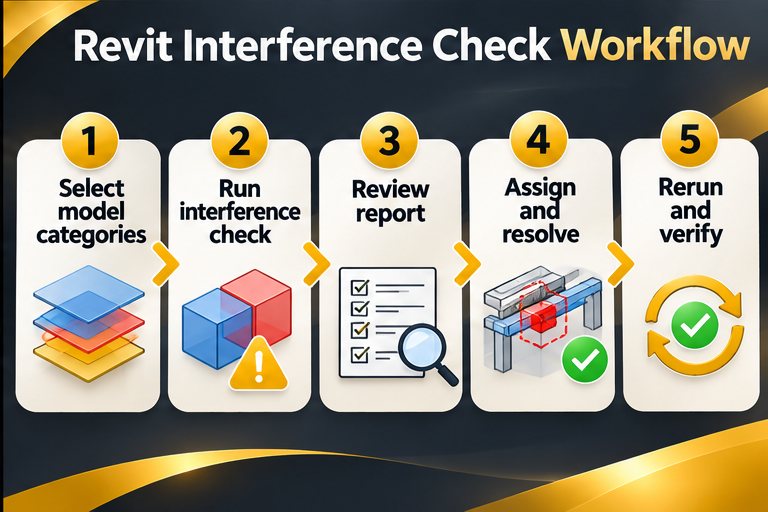
1. Agree on the coordination scope
Before opening the tool, confirm the model versions, shared coordinates, disciplines, intended level of detail and current design stage. Identify what should be checked and why. For example, review primary structural framing against large service ducts before detailed routing, then revisit smaller systems later. Assign an accountable coordinator and agree on issue priorities. A clash is not automatically a defect: some intersections represent intentional openings or approved penetrations. The team should distinguish real design conflicts from expected geometry.
2. Prepare the model and linked files
Open the appropriate Revit project and confirm that linked discipline models are current, correctly positioned and visible for review. Check units, levels and alignment. Select a manageable scope rather than checking every available category in a very large model. Autodesk notes that broad checks can take significant processing time. Establish an issue naming convention, such as discipline pair, location and issue number. Save the model and document the reference revisions before producing a report.
3. Run Interference Check with relevant categories
Autodesk’s published steps are to open the Collaborate tab, choose Interference Check and select Run Interference Check. In the dialog, choose the first category set and the second set, which can involve the current project or an appropriate linked model. Run the check and inspect the Interference Report. For example, a mechanical coordinator could check ducts against structural framing. Use the report to highlight affected elements and locate them in context. Repeat for additional targeted category pairs rather than interpreting a single run as exhaustive.
4. Review and triage reported intersections
Classify findings as genuine conflicts, intentional penetrations, duplicate geometry, modelling errors or items requiring more information. Record the element IDs, level, grid, discipline owners and screenshots where useful. Consider maintenance access, fire stopping, structural integrity and installation clearances; geometric overlap alone cannot resolve these questions. Assign each actionable issue an owner and due date. A coordinator should avoid quietly moving another discipline’s elements without approval. Preserve the decision trail for client and consultant review.
5. Resolve, rerun and verify
The responsible designer evaluates alternatives, updates the authorised model and communicates the revision. Recheck the affected category pair and verify that the change has not created a new conflict elsewhere. Autodesk’s documentation explains that refreshing an existing report is not equivalent to rerunning all possible checks; use a new targeted check when the scope has changed. Keep a record of accepted exceptions and the person who approved them. Closing a digital issue is not proof that the physical installation is safe or compliant.
When another coordination tool may be needed
Revit’s interference check is useful for selected geometric checks, but large federated projects may need additional issue-management, model federation and discipline-specific review tools. Autodesk notes that certain fabrication and detailed steel elements are outside the interference-check scope and points to Navisworks for those cases. Product packages and cloud collaboration entitlements vary, so check the current official documentation and quotation before selecting a workflow. This article does not assume that a Revit subscription includes every related Autodesk product.
BIM mandates and procurement in Malaysia
Do not infer a blanket statutory BIM obligation from a software feature. Malaysian public-sector guidance, client employer’s information requirements and individual tender conditions may set different obligations. A team preparing a bid should read the actual tender documents, identify the contracting authority, project category, applicable date and required deliverables, then obtain legal or procurement clarification where needed. This guide is about a practical coordination workflow; it makes no claim that interference checking itself satisfies any Malaysian law, standard or contractual requirement.
Build a repeatable weekly coordination meeting
For a small pilot, agree on two category pairs, run checks against a controlled model revision and create a short issue register. At the next meeting, review outstanding decisions, update affected models and rerun the checks. Measure outcomes with actual project records rather than invented clash-reduction percentages. FXIT lists Revit in its software catalogue; teams can review the product page and request a quotation describing their project disciplines, user count and desired coordination workflow. Independent technical review remains essential before issue for construction.
Explore the FXIT-listed software product, browse software solutions and request a quotation for your specific project requirements.
Official references and verification
Sources checked 7 November 2026: Autodesk reference 1; Autodesk reference 2. Features, subscriptions and availability should be reconfirmed against the applicable licence and project scope.
Visual workflow guide