November 10, 2026
Navisworks Manage Clash Detection Malaysia: BIM Coordination Review Checklist

Bahasa Melayu — Baca artikel penuh
Mengapa pengesanan pertembungan memerlukan proses
Navisworks Manage clash detection ialah topik penting untuk penyelaras BIM Malaysia yang mengurus model seni bina, struktur dan MEP. Pertembungan berwarna pada skrin tidak semestinya kecacatan pembinaan; sesetengah persilangan disengajakan dan yang lain memerlukan keputusan reka bentuk. Perisian mengenal pasti pertindihan geometri, tetapi pasukan berkelayakan mesti menilai kebolehbinaan, niat reka bentuk dan tanggungjawab kontrak. Panduan ini mengutamakan semakan yang boleh diulang, bukan dakwaan penjimatan tanpa bukti.
Sahkan produk dan sumber model
Katalog FXIT menyenaraikan Autodesk Navisworks Manage dan AEC Collection. Latihan rasmi Autodesk menerangkan Clash Detective, penggabungan model Revit, ujian pertembungan dan semakan hasil. Sahkan hak lesen dan edisi sebelum membeli; jangan anggap semua edisi Navisworks mempunyai fungsi yang sama. Setujui format model, tetapan eksport dan sistem koordinat bersama semua disiplin.
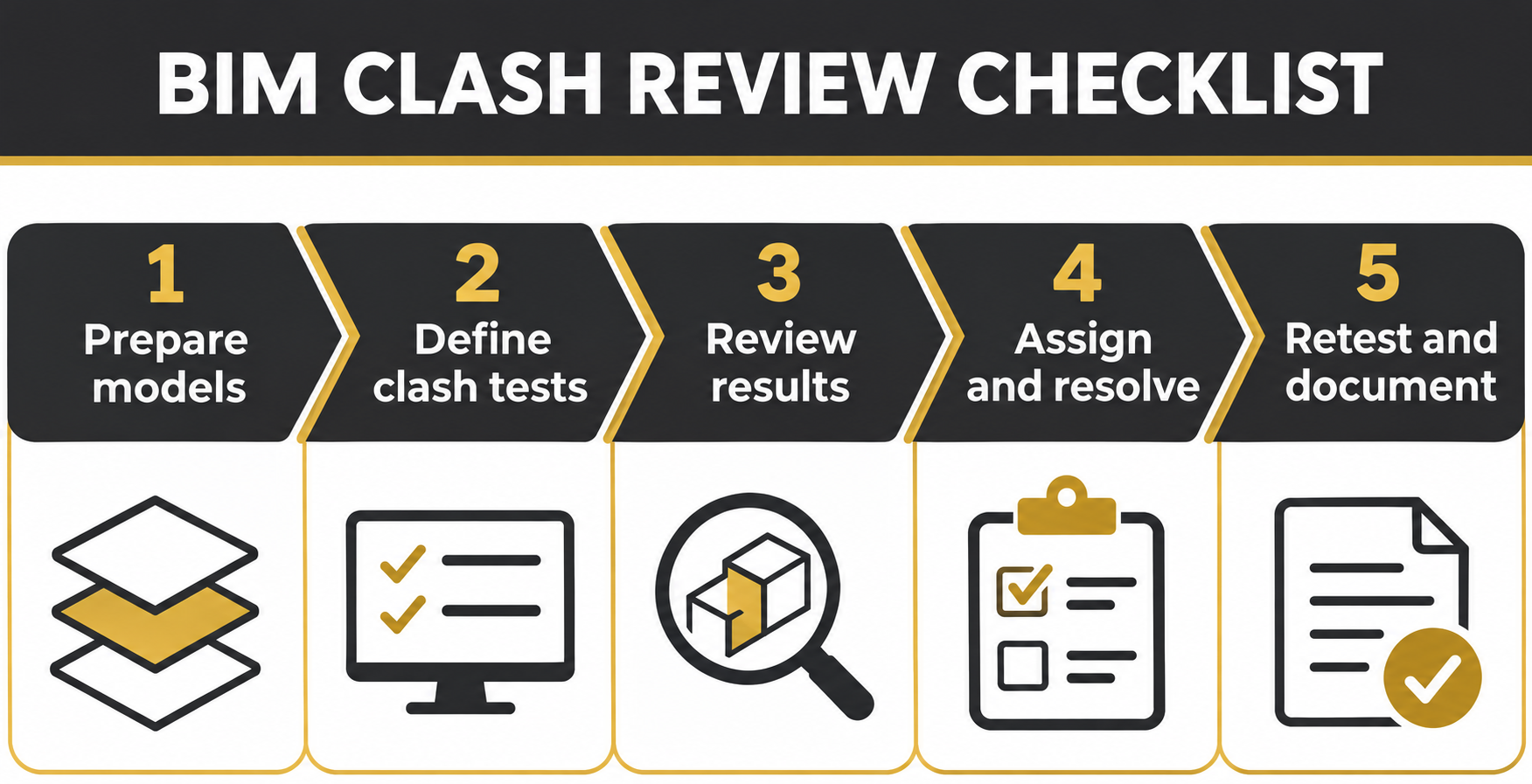
Langkah 1: daftar model terkawal
Rekod disiplin, semakan, asal, tarikh, penyedia dan tujuan setiap model. Kekalkan fail sumber asal dan gunakan pakej semakan bernama. Setujui koordinat bersama dan unit model. Model yang tidak sejajar boleh menghasilkan laporan mengelirukan walaupun perisian berfungsi. Tetapkan tarikh akhir penyerahan dan peraturan menggantikan fail lama. Setiap isu mesti boleh dijejak kepada semakan model tertentu.
Langkah 2: tentukan ujian pertembungan berguna
Jangan uji semua objek dengan semua objek tanpa strategi. Bina ujian terarah seperti struktur berbanding saluran udara, perkhidmatan berbanding siling, dan ruang akses peralatan. Bezakan pertembungan fizikal daripada kelegaan yang memerlukan toleransi dipersetujui. Rekod tujuan, set pilihan dan andaian setiap ujian. Catat persilangan disengajakan dan had perincian model supaya laporan tidak dipenuhi gangguan.
Langkah 3: tapis isu sebelum tugasan
Kumpulkan pertembungan berulang yang mempunyai punca sama, kemudian klasifikasikan tindakan diperlukan, keadaan diterima atau maklumat lanjut. Sertakan tangkapan skrin dan sudut pandangan yang menunjukkan konteks. Terangkan masalah fizikal, tetapkan disiplin bertanggungjawab dan tarikh respons. Jangan secara automatik menyalahkan pemodel MEP apabila paip kelihatan; penyelesaian mungkin memerlukan keputusan struktur atau seni bina.
Langkah 4: mesyuarat penyelarasan berfokus
Edarkan agenda ringkas yang menunjukkan isu kritikal belum selesai, konflik baharu dan keputusan lewat. Jemput wakil yang boleh meluluskan perubahan. Rekod pemilik, tindakan, kebergantungan dan tarikh semakan. Bezakan penyelarasan reka bentuk daripada kelulusan pembinaan. Akhiri mesyuarat dengan daftar isu terkawal versi serta akses yang sesuai dalam persekitaran data bersama.
Langkah 5: sahkan semakan model baharu
Isu tidak selesai hanya kerana status ditutup. Terima model sumber yang disemak, semak nombor revisi dan jalankan semula ujian. Periksa geometri berdekatan untuk konflik baharu. Kekalkan rujukan isu terdahulu. Tutup hanya apabila perubahan terbukti dalam model atau pengecualian didokumenkan dan diterima penyemak bertanggungjawab. Simpan bukti dan tarikh keluaran.
Jangan kelirukan koordinasi dengan mandat undang-undang
Kontrak atau tender tertentu mungkin mewajibkan penyelarasan BIM. Ini tidak bermaksud semua projek Malaysia diwajibkan menggunakan Navisworks Manage. Sahkan pelanggan, agensi, skop projek dan dokumen berkuat kuasa. Bagi perolehan kerajaan, rujuk keperluan tender dan pengurusan maklumat semasa.
Soalan kepada FXIT sebelum sebut harga
Tentukan keperluan lesen Navisworks Manage secara berasingan atau dalam koleksi yang sesuai, bilangan penyemak, format model dan siapa menyelenggara peraturan ujian serta daftar isu. FXIT menyenaraikan Navisworks Manage dan AEC Collection; rujuk katalog perisian dan halaman sebut harga. Aliran kerja koordinasi awan mempunyai hak dan prosedur berbeza. Tiada jaminan peratus produktiviti atau pematuhan dibuat.
Sumber rasmi dan pengesahan
Sumber: latihan rasmi Autodesk Navisworks dan bantuan Autodesk Model Coordination. Disahkan 10 November 2026. Sahkan lesen, keserasian format dan keperluan projek sebelum pelaksanaan.
简体中文 — 阅读全文
碰撞检测为何需要流程而不只是软件
Navisworks Manage 碰撞检测适合需要协调建筑、结构及机电模型的马来西亚 BIM 团队。屏幕上的彩色碰撞并不一定是施工缺陷:有些交叉是设计允许的,另一些需要进一步判断。软件能识别几何重叠,但仍须由合格团队评估可施工性、设计意图和合同责任。本文强调可重复的审核流程,不作未经证实的节省承诺。
确认产品及模型来源
FXIT 产品目录列有 Autodesk Navisworks Manage 和 AEC Collection。Autodesk 官方培训介绍 Clash Detective、Revit 模型整合、碰撞测试和结果审核。采购前须确认许可证和产品版本,不可假设所有 Navisworks 版本功能相同。各专业应预先同意模型格式、导出设置和坐标系统。
步骤一:建立受控模型登记表
记录每个模型的专业、修订、来源、日期、作者及协调用途。保留原始文件,并使用有名称的审核资料包。统一共享坐标和模型单位。若建筑与机电模型未对齐,即使软件正常,报告也可能误导。明确提交截止日期及旧版替换规则,每个问题都应可追溯至具体模型版本。
步骤二:制定有效的碰撞测试
不要毫无选择地测试所有对象。针对结构与风管、机电与吊顶、设备与检修空间等建立测试。区分实体碰撞与需要约定净空标准的情况。记录每个测试的目标、选择集及容差假设,并注明有意交叉和模型细节限制,避免大量无意义结果。
步骤三:分派前先筛选问题
将具有相同设计原因的重复碰撞归组,分类为需处理、可接受或待补充资料。附上能显示周围环境的截图和视角。描述实际问题、指定负责专业及回复期限。不能因为看见管道就把所有问题交给机电人员,解决方案可能涉及建筑或结构决策。
步骤四:召开以决策为中心的协调会议
提前发出议程,列出高优先级未解决问题、新冲突及逾期决定。邀请有权批准修改的代表。逐项记录负责人、解决建议、依赖条件和复核日期。区分设计协调与施工批准。会议结束时应形成版本受控的问题登记表,并确认相关人员拥有适当访问权限。
步骤五:核实下一版模型
问题状态改为关闭,并不代表碰撞已经解决。收到修订后的源模型后,核对版本并重新运行相关测试,同时检查附近几何是否出现新冲突。保留原问题编号,只有在模型中证实修改,或责任审核人正式接受有记录的例外时才关闭。保存证据及发布日期。
不要把项目协调要求等同于全国法律强制
特定合同或招标文件可能要求 BIM 协调,但不代表马来西亚所有项目依法必须使用 Navisworks Manage。必须核实业主、机构、项目范围和生效文件。政府项目应直接查看现行招标及信息管理要求。
向 FXIT 询价前应确认的事项
确认是否需要独立 Navisworks Manage 许可证或适当的产品集合、审核人员数量、建模软件、模型格式,以及谁负责后续维护测试规则和问题登记表。FXIT 列有 Navisworks Manage 和 AEC Collection,可查看软件目录及索取报价页面。云端协调方案的授权与流程不同,须另行确认。本文不承诺具体生产力提升或合规结果。
官方来源及核实
来源:Autodesk Navisworks 碰撞检测培训及 Autodesk Model Coordination 官方帮助。核实日期:2026 年 11 月 10 日。部署前须核实许可证、格式兼容性及项目要求。
English article
Why clash detection needs a process, not just software
Navisworks Manage clash detection Malaysia is a practical procurement topic for BIM coordinators handling architecture, structure and MEP models. A coloured collision on a screen is not automatically a construction defect: some intersections are intended, others need investigation, and many require design decisions. Software can identify geometry overlaps, but a qualified team must judge constructability, design intent and contractual responsibility. This checklist focuses on a repeatable review workflow rather than unsupported claims about project savings.
Confirm the right product and model sources
FXIT’s live catalogue lists Autodesk Navisworks Manage and the Architecture, Engineering & Construction Collection. Autodesk’s own training describes Clash Detective in Navisworks Manage and how teams aggregate Revit models, run clash tests and review results. Check the actual licence entitlement and product edition before purchasing; do not assume every Navisworks edition has the same clash functionality. Agree on accepted model formats, export settings and coordinate systems with all disciplines before the first meeting.
Step 1: create a controlled model register
Record each incoming model’s discipline, revision, origin, date, author and intended coordination use. Keep the source model unchanged, and work from a named review package. Agree on shared coordinates and model units. If the architectural and MEP models are not aligned, a clash report may be misleading even when the software is operating correctly. Define a model submission deadline and a clear rule for replacing superseded files. The coordinator should be able to trace every reported issue to the exact input model revision.
Step 2: define useful clash tests
Do not run every object against every other object and expect a useful meeting. Create targeted tests such as structure versus ductwork, services versus ceiling zones, and equipment clearance versus access routes. Decide which intersections require hard-clash review and which need an agreed clearance rule. Record the purpose, selection sets and tolerance assumptions for each test. Keep intentional intersections and model-detail limitations visible in the review notes. An overly broad test can create noise and distract the team from high-impact issues.
Step 3: triage before issuing tasks
Group repeated collisions that share one design cause, then classify each finding as action required, accepted condition or needs further information. Use screenshots and model viewpoints that show the surrounding context. Describe the physical problem and proposed decision, not just a clash number. Assign a responsible discipline and a response date. Avoid assigning every issue to the MEP modeller simply because a pipe is visible; the correct resolution may require architecture, structure or an agreed site method.
Step 4: hold a decision-focused coordination meeting
Circulate a short agenda showing unresolved high-priority issues, newly identified conflicts and overdue decisions. Invite representatives with authority to agree on changes. For each issue, record owner, proposed remedy, dependencies and target review date. Distinguish design coordination from construction approval. The meeting should close with a version-controlled issue register and agreed actions. If the project uses a common data environment, check that links, permissions and issue statuses are accessible to the people who must respond.
Step 5: verify the next model revision
A clash is not resolved because someone changed its status to closed. Receive the revised source model, check its revision and rerun the relevant test. Inspect nearby geometry for newly introduced conflicts. Preserve the previous issue reference so the team can see what changed. Close the issue only when the agreed design response is reflected in the reviewed model, or when the responsible reviewer formally accepts a documented exception. Record the evidence and release date for auditability.
Avoid confusing model coordination with a legal mandate
A project may require BIM coordination through its employer information requirements, tender documents or contract. That does not mean every Malaysian project is legally required to use Navisworks Manage. Verify the specific client, agency, project scope and effective documents before stating a mandatory workflow. For government or infrastructure procurement, ask for the actual current tender and information-management requirements rather than relying on a general marketing statement.
What to ask FXIT before requesting a quotation
Confirm whether Navisworks Manage is needed as a standalone product or within an appropriate collection, how many reviewers need access, and what authoring products and model formats the team uses. Clarify who will maintain test rules and issue registers after handover. FXIT lists Navisworks Manage and AEC Collection; browse FXIT software catalogue and request a quotation for a quotation discussion. For teams comparing cloud coordination options, Autodesk also documents Model Coordination, but its entitlements and workflows differ and should be checked separately. No invented productivity percentages or compliance claims are implied.
Official sources and verification
Autodesk Navisworks clash detection training and Autodesk Model Coordination help. Verified 10 November 2026. Confirm licence terms, file-format compatibility and project requirements before deployment.