November 12, 2026
MFA Rollout Checklist for Malaysian Businesses

Bahasa Melayu — Baca artikel penuh
Mengapa merancang MFA?
Pengesahan berbilang faktor menggunakan jenis bukti yang berbeza dan boleh mengurangkan risiko kata laluan dicuri. Kaedah dan pemulihan berbeza. Panduan CISA mengesyorkan MFA tahan pancingan data; ia bukan kewajipan undang-undang Malaysia.
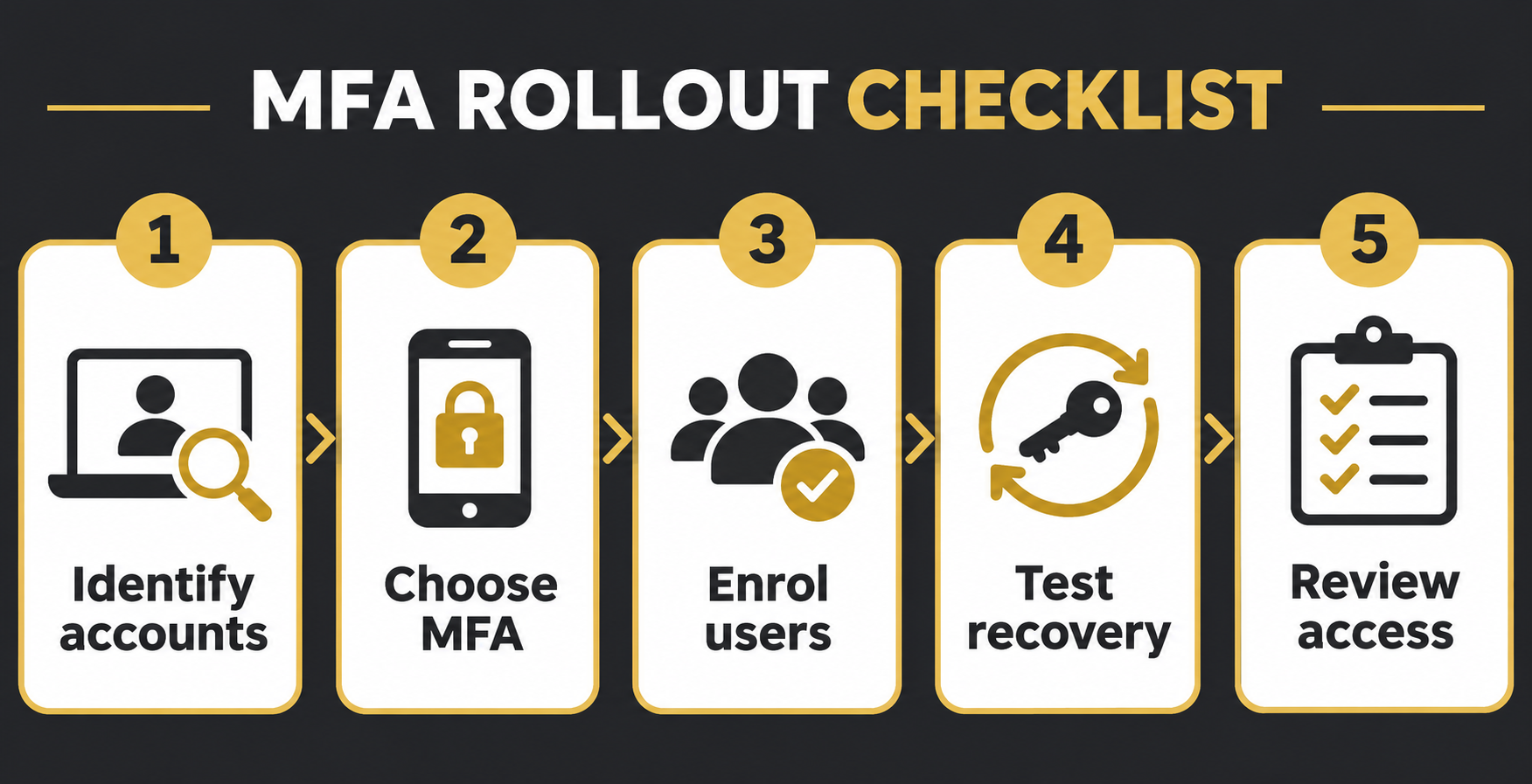
1. Kenal pasti akaun
Senaraikan e-mel, pentadbir identiti, kewangan, akses jauh dan sistem awan. Tentukan pemilik dan pengguna termasuk kontraktor serta akaun perkhidmatan. Utamakan akaun istimewa dan sistem berimpak tinggi, dan semak kaedah yang disokong.
2. Pilih dan uji kaedah
Jika disokong, nilai kunci keselamatan FIDO atau passkey mengikut dokumentasi dan polisi peranti. Kod sekali guna dan kelulusan push boleh dipancing; SMS tidak tahan pancingan data. Jika kaedah lebih kuat belum tersedia, gunakan MFA yang disokong sambil merancang peningkatan. Sahkan lesen, aksesibiliti dan keperluan peranti.
3. Daftar secara berperingkat
Mulakan dengan kumpulan kecil yang mewakili peranan dan keperluan berbeza. Terangkan bahawa permintaan tidak dijangka tidak boleh diluluskan, sediakan saluran bantuan dan laporan, dan uji aplikasi sebelum peluasan. Rekod pengecualian, pemilik dan tarikh semakan.
4. Rancang pemulihan
Dokumentasikan pengesahan identiti dan petugas yang dibenarkan membantu apabila peranti hilang. Jika disokong, daftar pengesah sandaran secara selamat sebelum penguatkuasaan. Uji pemulihan dan akses kecemasan pentadbir secara terkawal; lindungi kod pemulihan dan elakkan kaedah sandaran yang lemah.
5. Semak dan selenggara
Semak pendaftaran, akaun tidak aktif, pengecualian dan perubahan akses. Buang akses apabila pekerja keluar atau bertukar peranan. Siasat aktiviti luar biasa mengikut prosedur privasi dan keselamatan, uji perubahan dan simpan pelan undur. MFA melengkapi kawalan akses dan tindak balas insiden.
Langkah seterusnya
Rujuk perkhidmatan FXIT atau minta sebut harga. Sumber: panduan MFA tahan pancingan data CISA, disemak 12 November 2026. Sahkan fungsi dan lesen dengan penyedia perkhidmatan.
Contoh perintis dan peluasan
Pilih kumpulan ilustrasi daripada pentadbiran, kewangan dan IT yang menggunakan peranti berbeza. Semak aplikasi, kaedah serta pemulihan yang disokong. Uji log masuk dan cara melapor permintaan tidak dijangka. Jangan minta pengguna memberikan kata laluan, kod sekali guna atau kod pemulihan kepada meja bantuan.
Gunakan akaun terkawal untuk menguji kehilangan peranti dan pengesahan identiti. Tentukan pelulus pemulihan, bukti dan rekod; semak sama ada kaedah sandaran yang lemah menjejaskan perlindungan. Rancang tarikh, sokongan, arahan yang boleh diakses dan alternatif bagi pengguna tanpa telefon peribadi. Rekod sistem lama yang dikecualikan, pemilik dan tarikh semakan; pemilik perniagaan mesti menilai risiko. Selepas penguatkuasaan, bandingkan pendaftaran dengan inventori, siasat permintaan luar biasa dan uji semula pemulihan apabila peranti atau penyedia berubah.
Sebelum penguatkuasaan, tetapkan ujian penerimaan: log masuk, laporan permintaan mencurigakan dan pemulihan akaun ujian terkawal. Tetapkan pemilik bagi kegagalan dan uji semula selepas pembetulan. Rekod perkhidmatan, kaedah dan tarikh tamat pengecualian tanpa menyimpan kata laluan atau kod rahsia dalam log. Pastikan akses kecemasan disemak oleh petugas yang dibenarkan dan sokongan mencukupi sebelum peluasan.
简体中文 — 阅读全文
为何规划 MFA?
多因素认证使用不同类型的证据登录,可降低密码失窃带来的风险,但不同方法和恢复流程的安全性不同。CISA 建议采用抗钓鱼 MFA;美国指导文件并非马来西亚法律要求。
1. 识别账户
盘点企业邮箱、身份管理、财务、远程访问和云系统,明确负责人及用户,包括承包商和服务账户。优先保护特权账户与高影响系统,并确认支持的方法。
2. 选择并测试
如服务支持,根据官方说明和设备政策评估抗钓鱼 FIDO 安全密钥或通行密钥。一次性代码和推送确认可能被钓鱼;短信并非抗钓鱼方式。如果更强方法不可用,可先使用受支持的 MFA 并规划升级。确认许可、无障碍及设备要求。
3. 分阶段注册
先由不同角色和需求的小组试点。告知员工不要批准意外的登录请求,提供支持和报告渠道;扩大范围前测试所需应用。记录例外、负责人和复审日期。
4. 先设计恢复流程
记录设备或密钥丢失时的身份核实和授权支持流程。服务支持时,在强制实施前安全注册独立备用验证器。受控测试恢复和紧急管理员访问,保护恢复代码,避免不受管理的弱备用方式。
5. 持续复查
定期检查注册、停用账户、例外和权限变化。人员离职或转岗时及时移除权限。按隐私和安全流程调查异常活动,测试变更并保留回退计划。MFA 不能取代访问控制与事故响应。
下一步
可查看 FXIT 服务或索取报价。来源:CISA 抗钓鱼 MFA 指南,核查于 2026 年 11 月 12 日;具体功能和许可应向服务提供商确认。
试点与推广示例
可从行政、财务和 IT 中选择使用不同设备的小组试点,核对应用支持的方法与恢复方式,测试正常登录和异常提示报告。帮助台不应要求用户提供密码、一次性代码或恢复代码。
使用受控账户测试设备丢失及身份核实,明确恢复审批人、证据和日志,检查较弱备用方式是否削弱保护。规划实施日期、支持、无障碍说明及没有个人手机用户的替代方式。记录旧系统例外、负责人和复审日期,由业务负责人评估剩余风险。执行后将注册情况与清单比较、调查异常提示,并在人员、设备或服务变化时重新测试恢复。
强制实施前设定验收检查:试点用户能否登录、报告异常提示并恢复受控测试账户。为失败项指定负责人,整改后复测。记录服务、方式及例外到期日,不要在项目日志中记录密码或秘密恢复代码。确保授权人员审查紧急访问,并在推广前安排足够的支持。
Why plan an MFA rollout?
Multi-factor authentication (MFA) requires different types of evidence to sign in. It can reduce the risk from a stolen password, but methods and recovery processes differ. A practical rollout protects important accounts while ensuring that staff can still work and recover access safely. CISA recommends phishing-resistant MFA; its US guidance is not a Malaysian legal requirement.
1. Identify accounts and owners
Inventory business email, identity administration, financial services, remote access, cloud platforms and other critical systems. Identify an accountable owner and the people who depend on each service. Include administrators, contractors and service accounts, and check vendor-supported authentication methods. Prioritise privileged accounts and high-impact systems without overlooking ordinary user accounts.
2. Choose and test methods
Where supported, evaluate phishing-resistant FIDO security keys or passkeys against the service’s documentation and the organisation’s device policies. One-time codes and push approvals can be phished; SMS is not phishing-resistant. If stronger methods are unavailable, use a supported MFA method while planning an upgrade. Avoid claiming that any method prevents every attack. Confirm licensing, accessibility and user-device requirements before deployment.
3. Enrol in stages
Pilot with a small group representing different roles, devices and accessibility needs. Explain legitimate prompts and tell staff never to approve an unexpected request. Provide clear support contacts and a way to report suspicious prompts. Confirm the pilot can access necessary applications before extending the policy. Track coverage and exceptions with owners and review dates.
4. Design recovery before enforcement
Document how users recover access after a lost device or key, including identity verification and authorised support staff. Where the service supports it, enrol a separate backup authenticator securely before enforcing MFA. Test the recovery process and emergency administrator access under controlled conditions. Protect recovery codes and avoid weakening account security through an unmanaged fallback.
5. Review and maintain
Review enrolment, inactive accounts, exceptions and access changes regularly. Remove access promptly when people leave or change roles. Monitor and investigate unusual authentication activity within the organisation’s privacy and security procedures. Test changes with application owners and maintain a documented rollback plan. MFA complements, rather than replaces, strong access control and incident response.
Next step
Review your requirements with FXIT services or request a quotation. Source: CISA phishing-resistant MFA guidance, reviewed 12 November 2026. Confirm features and licensing with your service provider.
A controlled rollout example
For an illustrative pilot, select staff from administration, finance and IT who use different devices. Inventory the applications they need and confirm which methods and recovery options each provider supports. Enrol the pilot users, verify normal sign-in, and ask them to practise reporting an unexpected prompt. Do not ask anyone to disclose passwords, one-time codes or recovery codes to the help desk.
Test the loss of a registered device using a controlled account and the documented identity-verification procedure. Confirm who can approve recovery, what evidence is required, and how the action is logged. Review the recovery path for weaker fallbacks that could undermine the primary method. Store backup authenticators or recovery information according to the organisation’s security policy, and test emergency access without exposing credentials.
Prepare for wider deployment
Agree a rollout date, support coverage and a realistic enrolment deadline. Provide accessible instructions for users with different devices and arrange alternatives where a personal phone is unavailable. Review applications or legacy protocols that cannot support the desired method, document temporary exceptions, name their owners and set review dates. A documented exception is not proof that the remaining risk is acceptable; the responsible business owner must assess it.
After enforcement, compare enrolled users and required systems against the inventory, investigate unexpected prompts, and remove obsolete accounts and authenticators. Re-test recovery when staff, devices or providers change. Keep the incident response contact visible and rehearse the response to a suspected compromised account. MFA is one layer in a wider security programme, not a guarantee against all attacks.
Before changing enforcement, agree measurable acceptance checks: whether each pilot user can sign in, report an unexpected prompt and recover a controlled test account. Assign a support owner to each failed check and retest after correction. Record the service, method and exception expiry date without recording passwords or secret recovery codes in the project log. Ensure that emergency access is reviewed by authorised staff and that the support process has adequate coverage during the transition. Expand only when the agreed checks pass.