
November 24, 2026
CAD Drawing Revision Control in Malaysia: A Practical Project Checklist

Bahasa Melayu
Mulakan dengan daftar bersama
Masalah revisi lukisan boleh mengganggu perolehan, koordinasi dan kerja tapak walaupun model tepat. Pasukan projek Malaysia memerlukan cara jelas mengenal pasti lukisan diluluskan, status, pemilik dan penerima. Proses bergantung pada kontrak dan keperluan maklumat projek; panduan ini tidak menetapkan piawaian undang-undang sejagat.
Senaraikan fail dan tanggungjawab
Sediakan daftar dengan ID lukisan unik, tajuk, disiplin, revisi, status, tarikh, pengarang, penyemak dan penerima. Pautkan kepada lokasi fail terkawal, bukan bergantung pada lampiran e-mel semata-mata. Setujui siapa boleh menukar revisi, menyemak dan mengeluarkan dokumen kepada kontraktor atau pelanggan.
Asingkan kerja dan terbitan
Gunakan ruang berbeza untuk kerja dalam proses, semakan dalaman, terbitan diluluskan dan arkib. Fail paling baru disimpan tidak semestinya diluluskan untuk pembinaan. Persetujui istilah status dan penamaan serta cara daftar menunjukkan terbitan sah terkini. Semak hak akses apabila ahli meninggalkan projek.
Semak kebergantungan lukisan
Sebelum terbit, semak blok tajuk, penerangan revisi, tarikh, skala, unit dan fail rujukan. Pastikan rujukan luaran, model terpaut, fon dan hasil cetakan tersedia kepada penerima. Bandingkan PDF atau helaian contoh dengan fail asal dan siasat elemen hilang. Koordinasikan disiplin berkaitan dan rekod isu tertunda.
Rekod setiap terbitan terkawal
Simpan rekod serahan yang menyatakan fail, nombor revisi, tujuan, penerima, tarikh dan orang bertanggungjawab. Minta pengesahan penerimaan jika diwajibkan kontrak atau dipersetujui. Kenal pasti lukisan yang diganti dan jelaskan cara pasukan tapak menandakan atau mengeluarkan salinan lapuk. Jangan padam sejarah yang diperlukan untuk memahami keputusan terdahulu.
Gunakan sejarah versi dengan teliti
Platform pengurusan dokumen boleh menyimpan versi dan aktiviti terdahulu, tetapi versi disimpan berbeza daripada revisi kontrak yang diluluskan. Tetapkan kebenaran, semakan dan tempoh simpanan mengikut projek. Autodesk Docs menyediakan sejarah versi dan kebenaran fail; uji konfigurasi sebenar serta semak terma produk semasa sebelum memilih perkhidmatan.
Rancang pengecualian dan pemulihan
Tentukan tindakan apabila lukisan perlu diterbitkan segera, penyemak tiada, fail tertindih atau penerima bekerja luar talian. Rekod pengecualian, pelulus dan tindakan susulan. Kekalkan sandaran dan proses pemulihan yang diuji serta pastikan rujukan yang dipulihkan masih berfungsi. Penyegerakan semata-mata tidak semestinya memenuhi keperluan sandaran sejarah.
Rintis dan senarai penerimaan
Uji proses pada pakej lukisan kecil sebelum terbitan besar. Minta penyemak mencari revisi diluluskan terkini, membandingkannya dengan rekod terbitan dan mendapatkan revisi lama. Pastikan penerima tapak boleh membuka dan mencetak fail serta salinan lapuk ditandakan. Rekod kegagalan, tetapkan pemilik dan uji semula selepas pembetulan.
Serahan dan langkah seterusnya
Serahkan daftar dipersetujui, fail diluluskan, sejarah terbitan, pengecualian tertunda dan pemilik dokumen. Sahkan versi perisian dan kebenaran penerima serta sama ada fail sumber boleh sunting atau helaian terbitan diperlukan. Untuk pertanyaan perisian FXIT, terangkan pasukan, format fail dan keperluan kerjasama sebelum meminta sebut harga. Semak terma pengeluar dan kontrak semasa.
Soalan untuk pasukan
Adakah nombor fail lebih tinggi membuktikan kelulusan? Tidak; semak status dan rekod terbitan. Bolehkah folder bersama menggantikan proses semakan? Folder menyimpan fail, tetapi tanggungjawab dan kelulusan masih perlu ditetapkan. Patutkah terbitan lama ditindih? Kekalkan rekod mengikut kontrak dan polisi simpanan dengan kawalan akses sesuai.
Persetujui pakej terbitan sebelum tarikh akhir
Sebelum terbitan dirancang, adakan semakan ringkas bersama pemilik lukisan, penyemak dan penerima. Sahkan daftar, fail rujukan dan format, kemudian bandingkan helaian terbitan dengan sumber. Kenal pasti andaian atau ulasan tertunda yang menjejaskan disiplin lain. Jika perubahan diperlukan selepas terbitan, rekod pelulus dan maklumkan semua penerima terlibat melalui saluran dipersetujui.
Simpan bukti penerimaan dan pastikan terbitan terkini mudah dicari. Pada semakan projek berikutnya, bandingkan sampel daftar dengan fail sebenar dan betulkan percanggahan dengan segera. Amalan yang konsisten lebih penting daripada nama perisian.
简体中文
建立共享登记表
即使模型准确,图纸修订问题仍可能影响采购、协调和现场施工。马来西亚项目团队需要清楚识别当前获批图纸、状态、负责人及接收人。具体流程取决于合同和项目信息要求,本文不规定普遍适用的法律标准。
列明文件与责任
建立登记表,记录唯一图号、标题、专业、当前修订、状态、日期、作者、审核人和发送对象。链接到受控文件位置,避免仅以邮件附件作为记录。约定谁能修改修订、谁负责审核以及谁有权向承包商或客户发布。
区分工作文件与发布文件
为进行中、内部审核、批准发布和归档设置清晰区域。最近保存的文件不一定获准用于施工。项目开始前约定状态术语、命名规则以及登记表如何标识最新授权版本。人员离开时复核访问权限。
检查图纸依赖
发布前检查标题栏、修订说明、日期、比例、单位和引用文件。确认接收方可以获取外部参照、链接模型、字体和打印成果。将代表性 PDF 或图纸与源文件比较并调查缺失内容。协调相关专业,记录尚未解决的问题。
记录每次受控发布
保留传递单或同等记录,注明文件、修订号、目的、接收人、日期和负责人。如合同或约定流程要求,请接收人确认收到。标识已被取代的图纸,说明现场如何移除或标记过期副本。不要删除理解历史决定所需的记录。
谨慎使用版本历史
文档管理平台可以保留旧文件版本和活动记录,但保存的版本不等于已批准的合同修订。按项目需要配置权限、审查流程和保留期。Autodesk Docs 提供文件版本历史和权限;选择服务前应测试实际配置并核实当前产品条款。
规划例外与恢复
明确图纸紧急发布、审核人不可用、文件被覆盖或接收方离线时的处理方式。记录例外、批准人及后续行动。保持经过测试的备份和恢复流程,并验证恢复后的参照仍可使用。同步本身不一定满足历史备份要求。
试点与验收清单
重大发布前,用少量代表性图纸测试流程。请审核人找到最新批准修订,与发布记录核对并取回旧版本。确认现场接收人能够打开和打印文件,过期副本得到标记。记录失败步骤、指定负责人,整改后重新测试。
移交与下一步
移交约定的图纸登记表、批准文件、发布历史、未解决例外及文件负责人。与接收团队确认软件版本和权限,明确需要可编辑源文件还是发布图纸。向 FXIT 咨询软件时,请说明团队、文件格式和协作要求,并核实项目适用的最新厂商及合同要求。
团队常见问题
文件名数字更大就证明已获批准吗?不能,应核对状态和发布记录。共享文件夹能替代审核流程吗?它可以存储文件,但仍需明确责任与批准。旧版本应被覆盖吗?应按合同和保留政策保存必要记录,并设置适合项目敏感程度的权限。
在截止日期前确认发布包
每次计划发布前,与图纸负责人、审核人及接收人进行简短协调审查。确认登记表、引用文件和预期格式,并将发布图纸与源文件比较。识别可能影响其他专业的假设或未解决意见。发布后如需修改,记录批准人并通过约定渠道通知所有受影响的接收人。
保留验收证据,确保容易找到当前版本。在下一次项目审查中抽样核对登记表和实际文件,及时纠正差异。一致执行流程比使用何种软件更重要。
English
CAD Drawing Revision Control in Malaysia: A Practical Project Checklist
Start with a shared register
A drawing revision problem can disrupt procurement, coordination and site work even when the model itself is accurate. Malaysian project teams need a clear way to identify the current approved drawing, its status, its owner and the people who received it. The right process depends on the contract and project information requirements; this guide does not prescribe a universal legal standard.
List files and responsibilities
Create a register with a unique drawing identifier, title, discipline, current revision, status, date, author, reviewer and issue destination. Link the register to the controlled file location rather than relying on email attachments as the sole record. Agree who can change a revision, who reviews it, and who may issue a document to contractors or the client.
Separate work in progress from issue
Use clearly distinguished areas for work in progress, internal review, approved issue and archive. A file saved most recently is not automatically approved for construction. Agree a status vocabulary and a naming convention before teams begin, and explain how the register identifies the latest authorized issue. Access rights should match actual responsibilities and be reviewed when people leave the project.
Review drawing dependencies
Before issuing a drawing, check its title block, revision description, date, scale, units and referenced files. Verify that external references, linked models, fonts and plotted output are available to the recipient. Compare a representative PDF or plotted sheet with the source file and investigate missing elements. Coordinate related disciplines and record outstanding issues rather than concealing them.
Record every controlled issue
Keep a transmittal or equivalent issue record stating the files and revision numbers, purpose, recipients, issue date and responsible person. Ask recipients to acknowledge receipt where the contract or agreed workflow requires it. Identify superseded drawings and explain how site teams will remove or mark obsolete copies. Avoid deleting history needed to understand earlier decisions.
Use version history carefully
A document management platform may maintain earlier file versions and an activity record, but a saved version is not the same as an approved contractual revision. Configure permissions, review workflows and retention according to project needs. Autodesk Docs provides file version history and permissions; test the actual configuration and verify current product terms before selecting any service.
Plan exceptions and recovery
Define what happens when a drawing is issued urgently, a reviewer is unavailable, a file is accidentally overwritten or a recipient works offline. Record the exception, responsible approver and follow-up. Maintain a tested backup and recovery process and verify that restored references still work. Do not assume that synchronisation alone provides the required historical backup.
Pilot and acceptance checklist
Test the process on a small representative drawing package before a major issue. Ask a reviewer to find the current approved revision, compare it with the issue record and retrieve an earlier revision. Check that a site recipient can open and print the file, and that obsolete copies are clearly marked. Record failed steps, assign owners and repeat the test after corrections.
Handover and next steps
At handover provide the agreed drawing register, approved files, issue history, outstanding exceptions and document owner. Confirm software versions and permissions with the receiving team, and specify whether editable source files or only published sheets are required. For FXIT software enquiries, describe your team, file formats and collaboration requirements before requesting a quotation. Verify current vendor and contract requirements for the project.
Questions teams should ask
Does a higher filename number prove a drawing is approved? No; consult the agreed status and issue record. Can a shared folder replace a review procedure? It can store files, but responsibilities and approvals still need to be defined. Should teams overwrite old releases? Preserve the records required by their contract and retention policy, with access controls appropriate to the sensitivity of the project.
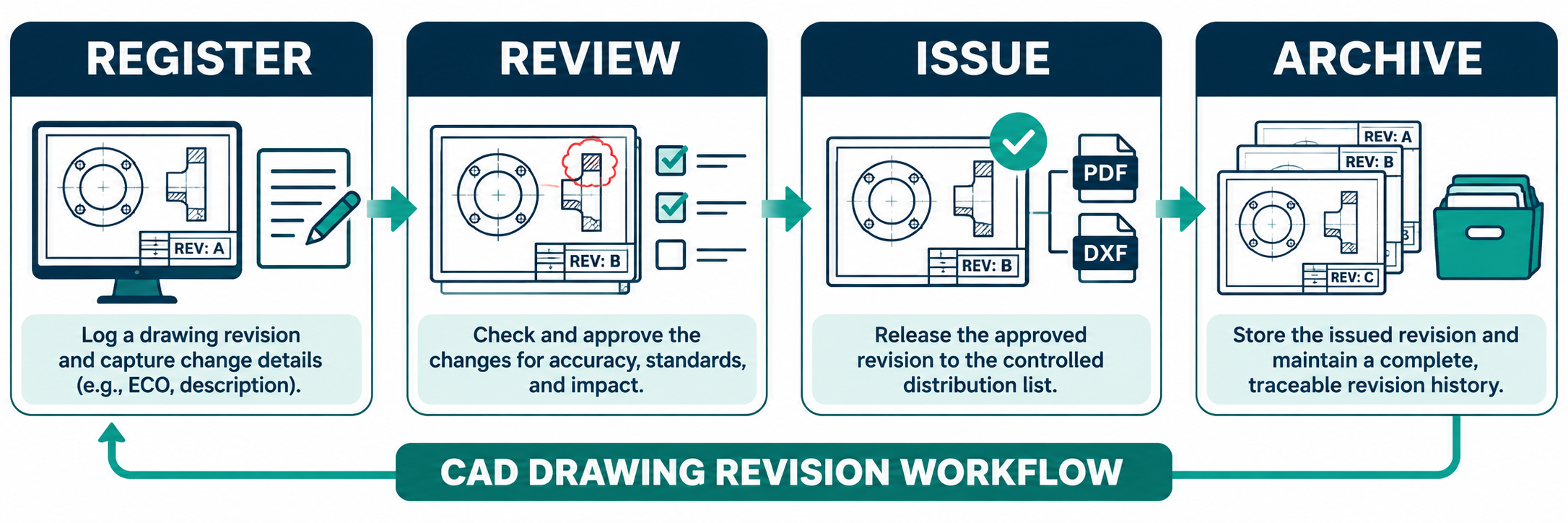
Agree the issue package before deadlines
Before each planned issue, hold a short coordination review with the drawing owner, reviewer and recipient. Confirm the register, referenced files and expected format, then compare the published sheet against its source. Identify any assumptions or unresolved comments that could affect another discipline. If a change is required after issue, record who authorised it and notify every affected recipient using the agreed channel.
Retain evidence of acceptance and make the current issue easy to find. At the next project review, sample the register against actual files and correct discrepancies promptly. Consistent practice matters more than the name of the software used.
Source checked 24 November 2026: Autodesk Docs: File and Folder Actions.