
November 28, 2026
Revit Quantity Schedules in Malaysia: A Practical Review Checklist

Bahasa Melayu
Jadual Kuantiti Revit di Malaysia: Senarai Semak Semakan
Mulakan dengan tujuan
Jadual Revit membantu pasukan reka bentuk atau projek Malaysia menyusun maklumat elemen model. Sebelum mengeluarkan kuantiti, persetujui kegunaan, penyemak dan keperluan projek. Jadual daripada model tidak secara automatik menjadi bil kuantiti disahkan atau menggantikan pengukuran profesional dan semakan komersial.
Tentukan skop
Nyatakan versi model, disiplin, kawasan, fasa dan kategori dalam semakan. Kenal pasti model terpaut atau elemen dikecualikan serta tarikh potong. Rekod sama ada hasil untuk anggaran awal, koordinasi atau tujuan lain. Tahap pembangunan model dan kaedah ukuran dipersetujui menentukan tahap kebergantungan yang munasabah.
Semak model dahulu
Pastikan elemen wakil wujud dalam lokasi dan kategori dijangka serta parameter diisi secara konsisten. Siasat pendua, kawasan hilang dan pemegang tempat yang jelas. Selaraskan pembetulan dengan pemilik dan jangan ubah model bersama tanpa kelulusan. Rekod jurang supaya data hilang tidak disangka kuantiti sifar.
Sediakan jadual secara sengaja
Autodesk menerangkan cara memilih kategori dan fasa, kemudian medan, penapis, susunan serta format. Semak arahan produk dan versi tepat. Pilih medan yang menjawab persoalan dan rekod penapis, pengelompokan serta nilai dikira. Penapis berbeza boleh mengubah hasil dengan ketara.
Semak kategori dan parameter
Pastikan kategori merangkumi elemen diperlukan dan parameter berkaitan wujud serta digunakan secara konsisten. Bagi parameter kongsi atau model terpaut, uji konfigurasi sebenar dan rekod pengecualian. Semak sama ada baris berkumpulan menyembunyikan perbezaan. Tanya pengarang tentang klasifikasi tidak pasti sebelum menganggap hasil lengkap.
Sahkan unit dan pengiraan
Semak unit, pembundaran, takrif ukuran dan pengendalian bukaan, bahan atau syarat projek. Bandingkan sampel nilai dengan sifat model dan ukuran bebas atau lukisan jika sesuai. Siasat perbezaan, jangan memaksa jumlah sepadan. Rekod kaedah dan andaian setiap perbandingan.
Kawal revisi dan tanggungjawab
Kenal pasti penyedia, penyemak dan versi model sumber. Simpan hasil serta andaian di lokasi projek diluluskan. Jika model berubah, tentukan sama ada jadual perlu dijana dan disemak semula. Maklumkan had dan jangan edarkan ekstrak lapuk seolah-olah ia versi terkini.
Rintis dengan sampel wakil
Pilih satu kategori atau zon yang boleh diurus dan tetapkan kriteria sebelum peluasan. Minta penyemak menjejak baris kepada elemen model, memeriksa nilai dan memahami pengecualian. Rekod isu, pemilik dan tindakan. Uji aliran kerja dengan penerima sebenar.
Lindungi maklumat projek
Gunakan kawalan akses diluluskan bagi model dan eksport, terutama butiran komersial sensitif. Elakkan kuantiti atau kadar sulit dalam pautan awam. Sahkan pihak yang boleh menyunting, meluluskan dan mengedar serta tempoh simpanan. Jangan masukkan kelayakan dalam buku kerja bersama.
Serahan dan langkah seterusnya
Berikan jadual, versi model, skop, penapis, unit, andaian, pengecualian dan isu tertunda kepada penerima. Pastikan eksport boleh dibuka dan batasnya difahami. Untuk pertanyaan perisian, terangkan disiplin dan aliran kerja kepada FXIT serta sahkan fungsi, sokongan dan terma lesen semasa.
Soalan lazim
Adakah Revit menghasilkan bil kuantiti lengkap secara automatik? Tidak; hasil bergantung pada model, konfigurasi dan proses ukuran. Adakah jadual mengemas kini hamparan eksport secara automatik? Jangan anggap begitu; uji aliran kerja. Bolehkah jumlah yang kelihatan kemas menggantikan semakan bebas? Tidak. Semak sampel secara terdokumen.
Semak sebelum terbitan
Minta penyemak dibenarkan meluluskan skop dan semakan sampel mengikut proses projek. Rekod perbezaan tertunda, pemilik dan kesesuaian hasil bagi tujuan dinyatakan. Jika versi model atau penapis berubah, ulangi semakan berkaitan. Rekod boleh dijejak membantu pengguna memahami liputan dan pengecualian.
Tambah baik proses
Selepas rintis, bandingkan isu mengikut kategori dan tentukan keperluan templat, parameter atau latihan. Persetujui perubahan dengan pemilik dan uji pada salinan terkawal jika sesuai. Kekalkan sejarah versi ringkas dan semak pada peringkat projek. Jangan jamin penjimatan masa tetap tanpa mengukur aliran sebenar.
Uji perubahan sebelum peluasan
Jika sampel menunjukkan parameter tidak konsisten atau elemen hilang, persetujui pembetulan dan pelulus. Ulangi semakan sampel selepas kemas kini dan rekod hasil. Jika hasil terbitan berubah, ikuti proses revisi dan komunikasi projek. Jangan ubah model operasi semata-mata untuk menjadikan jumlah kelihatan betul.
Simpan jejak keputusan
Dokumentasikan sama ada hasil diterima, diterima dengan batasan atau dikembalikan untuk pembetulan. Simpan rujukan model dan bukti mengikut peraturan projek. Pastikan penyemak ganti dibenarkan dapat mencari rekod serta memahami isu terbuka. Semak proses apabila keperluan penerima berubah.
简体中文
马来西亚 Revit 工程量明细表:实用审核清单
从用途开始
Revit 明细表可帮助马来西亚设计或项目团队整理模型元素信息。提取数量前,应约定用途、审核人及适用的项目信息要求。模型明细表不会自动成为已核实的工程量清单,也不能代替专业计量和商务审查。
明确范围
规定审查的模型版本、专业、区域、阶段及类别,标明链接模型或排除元素和截止日期。说明输出用于初步估算、协调还是其他用途。模型发展程度及项目约定的计量规则决定数据可被合理依赖的程度。
先检查模型
检查代表性元素是否位于预期位置和类别,参数是否一致填写。调查明显重复、缺失区域和占位内容。与模型负责人协调修改,不得未经批准更改共享模型。记录已知缺口,避免把缺失数据误认为零数量。
有意识地设置明细表
Autodesk 介绍了选择类别和阶段,再选择字段、筛选、排序及格式的明细表创建方式。应核对具体产品和版本的说明。选择能回答问题的字段,并记录筛选、分组及计算值;不同筛选可能显著改变结果。
审查类别和参数
确认所选类别包含任务所需元素,相关参数存在且使用一致。涉及共享参数或链接模型时,测试实际配置并记录排除项。检查分组行是否掩盖个体差异。将结果视为完整前,应向模型作者询问不确定分类。
核实单位和计算
检查单位、舍入、计量定义及洞口、材料或其他项目条件的处理。适当时将部分明细表数值与模型属性、独立测量或图纸比较。调查差异,不要强行使总数一致,并记录每项比较的方法和假设。
控制修订与责任
明确明细表编制人、审核人及来源模型版本,将输出和支持假设保存在批准的项目位置。模型变化时判断是否需要重新生成并审查。传达已知限制,不要将过期导出当作最新模型结果分发。
用代表性样本试点
选择一个可管理的类别或区域,扩展前确定验收标准。请审核人将选定行追溯到对应模型元素、检查数值并确认排除项。记录问题、负责人及行动,并与实际接收数据的人员测试流程。
保护项目信息
对模型和导出文件使用批准的访问控制,尤其涉及商业敏感内容时。不要将机密数量或费率放在不受限制的公开链接。明确谁能编辑、批准、分发及保留多久,不在共享工作簿中保存凭据。
交接与下一步
向接收团队提供明细表、模型版本、范围、筛选、单位、假设、排除项及未解决问题,确认对方能打开导出文件并理解限制。咨询软件时可向 FXIT 说明专业及工作流程,并核实当前产品功能、支持和许可条款。
常见问题
Revit 会自动生成完整工程量清单吗?不会,结果取决于模型内容、配置及约定计量流程。明细表会自动更新导出的电子表格吗?不要假设,应测试工作流程。整洁的总数能代替独立核查吗?不能,应先完成有记录的抽样审查。
发布前审核
由授权审核人按项目正常流程确认范围和抽样检查,记录未解决差异、负责人及输出是否适合所述用途。模型版本或筛选变化时重复相关检查。可追溯记录可帮助下一位用户了解数字包含与不包含的内容。
改进流程
试点后比较各类别发现的问题,判断模板、参数或培训是否需要改进。与模型负责人约定修改,适当时在受控副本测试。保持简单版本记录并在项目里程碑审查。未经实际工作流测量,不要承诺固定节省时间。
扩大使用前测试修改
样本发现参数不一致或元素缺失时,应约定修正方式及批准人。更新后重复同一抽查并记录结果。若修正改变已发布交付物,应遵循项目修订及沟通流程。不要仅为让总数好看而修改生产模型。
保留决定记录
记录输出是被接受、附限制接受还是退回修正,并按项目保留规则保存模型参考和审核证据。确保授权替补审核人能找到记录并理解未关闭问题。接收团队的信息要求变化时应审查流程。
English
Revit Quantity Schedules in Malaysia: A Practical Review Checklist
Begin with the intended use
A Revit schedule can help a Malaysian design or project team organise information about model elements. Before extracting quantities, agree what the numbers will be used for, who will review them and which project information requirements apply. A model-derived schedule is not automatically a verified bill of quantities or a substitute for professional measurement and commercial review.
Define the scope
Specify the model version, discipline, project area, phase and categories included in the review. Identify linked models or excluded elements and state the cut-off date. Record whether the output is for an early estimate, coordination or another purpose. The level of model development and the project’s agreed measurement rules determine what can reasonably be relied on.
Check the model first
Review whether representative elements exist in the expected locations and categories, and whether their parameters are populated consistently. Investigate obvious duplicates, missing areas and placeholders. Coordinate any correction with the model owner and avoid making unapproved changes to shared project models. Record known gaps so that a reviewer does not mistake missing data for zero quantity.
Set up the schedule deliberately
Autodesk documents the creation of a schedule by selecting a category and phase, then choosing fields, filters, sorting and formatting. Check the instructions for the exact product and release in use. Select fields that answer the agreed question and keep a record of filters, grouping and any calculated values. A different filter can materially change the result.
Review categories and parameters
Confirm that the chosen category includes the elements required for the task and that relevant parameters exist and are used consistently. Where shared parameters or linked models are involved, test the actual configuration and document exclusions. Check whether grouped rows conceal individual differences. Ask the model author about uncertain classifications before treating the output as complete.
Verify units and calculations
Check units, rounding, measurement definitions and the intended treatment of openings, materials or other project-specific conditions. Compare a small sample of scheduled values with model properties and an independent measurement or drawing where appropriate. Investigate differences rather than forcing totals to agree. Record the method and assumptions used for each comparison.
Control revisions and responsibility
Identify the person who prepared the schedule, the reviewer and the model version from which it was produced. Save the output and its supporting assumptions in the approved project location. If the model changes, determine whether the schedule must be regenerated and reviewed. Communicate known limitations and avoid distributing an outdated extract as though it reflects the latest model.
Pilot with a representative sample
Choose one manageable category or project zone and define acceptance criteria before expanding. Ask a reviewer to trace selected rows to the corresponding model elements, check the values and confirm that excluded items are understood. Record issues, owners and the action taken. Test the review workflow with the recipients who will actually use the data.
Protect project information
Use approved access controls for models and exports, particularly when the output includes commercially sensitive details. Avoid placing confidential quantities or rates in unrestricted public links. Confirm who can edit, approve and distribute the file and how long it should be retained. Do not include account credentials in a shared workbook.
Plan handover and next steps
Provide the schedule, model version, scope, filters, units, assumptions, exclusions and outstanding issues to the receiving team. Confirm that the recipient can open the export and understands its limitations. For a software enquiry, describe the model disciplines and workflow to FXIT, and verify current product features, support and licence terms.
Common questions
Does Revit automatically create a complete bill of quantities? No; the result depends on model content, configuration and the agreed measurement process. Does a schedule update an exported spreadsheet automatically? Do not assume it does; test your workflow. Can a clean-looking total replace independent checking? No. Use a documented sample review before relying on any quantity.
Review before release
Have an authorised reviewer sign off the scope and sample checks in the project’s normal process. Record unresolved differences, who owns them and whether the output is suitable for its stated purpose. If a model version or filter changes, repeat the relevant checks. A traceable record helps the next user understand what the figures include and what they do not.
Improve the process
After a pilot, compare issues found across categories and identify whether templates, parameters or training need attention. Agree changes with the model owner and test them on a controlled copy where appropriate. Maintain a simple version history and review at project milestones. Avoid promising a fixed time saving without measuring the actual workflow.
Test a change before wider use
When a sample reveals an inconsistent parameter or missing element, agree how the issue will be corrected and who can approve the change. Repeat the same sample check after the update and record the result. If correction changes a published deliverable, follow the project’s normal revision and communication process. Do not modify production models merely to make a schedule total look right.
Keep a decision trail
Document whether the output was accepted, accepted with limitations or returned for correction. Retain the model reference and review evidence according to the project retention rules. Ensure an authorised replacement reviewer can locate the record and understand which issues remain open. Review the process when the receiving team’s information requirements change.
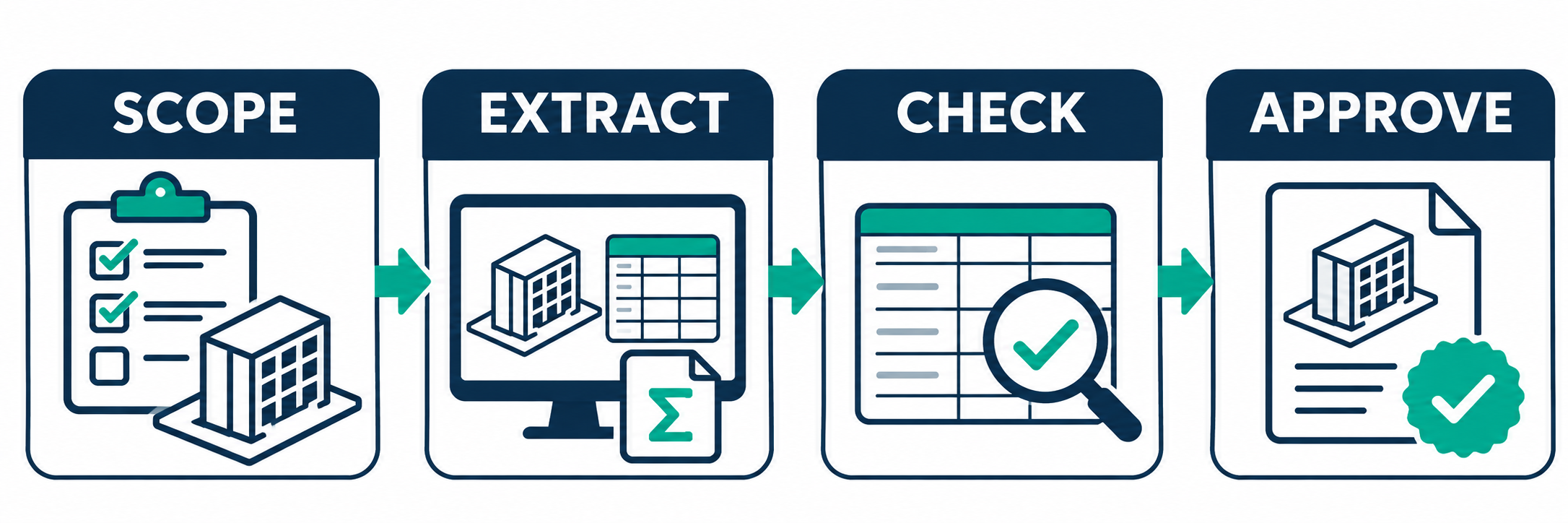
Source checked 28 November 2026: Autodesk: Create a Schedule or Quantity.