November 9, 2026
Autodesk Inventor iLogic Automation Malaysia: A Practical Manufacturing Checklist
Bahasa Melayu — Baca terjemahan
Mengapa reka bentuk boleh konfigurasi perlu diseragamkan
Pengeluar mesin di Malaysia sering menghasilkan keluarga produk yang serupa seperti rangka pam, kabinet dan modul penghantar. Saiz serta pilihan berubah, tetapi asas kejuruteraan perlu konsisten. Autodesk Inventor iLogic membolehkan keputusan berulang dikodkan dalam model parametrik. Matlamatnya bukan menggantikan jurutera, sebaliknya mengurangkan kerja konfigurasi berulang dengan semakan manusia.
Keupayaan dan had iLogic
Menurut dokumentasi Autodesk, iLogic menggunakan peraturan, parameter, logik bersyarat dan borang. Peraturan boleh menukar dimensi, ciri dan komponen. Namun, ia tidak membuktikan keselamatan beban, kesesuaian toleransi atau pematuhan spesifikasi pelanggan. Jurutera masih perlu menyemak lukisan, bahan, pemasangan dan kekangan pembuatan. Automasi peraturan bukan semestinya kecerdasan buatan generatif.
Aliran kerja praktikal
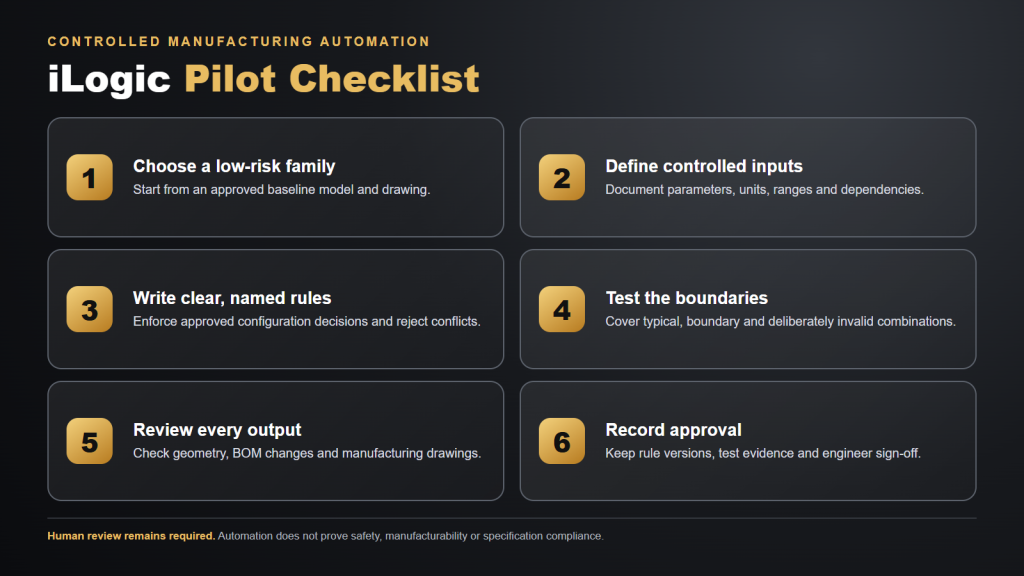
Pilih keluarga komponen berisiko rendah dan lukisan asas yang diluluskan. Tentukan parameter input termasuk dimensi, jarak lubang, orientasi dan bahan. Bina peraturan bernama yang menguatkuasakan julat serta pergantungan pilihan. Uji nilai biasa, nilai sempadan dan kombinasi tidak sah. Semak geometri, senarai bahan serta lukisan dengan jurutera bertanggungjawab. Rekod versi dan kelulusan.
Contoh kabinet peralatan
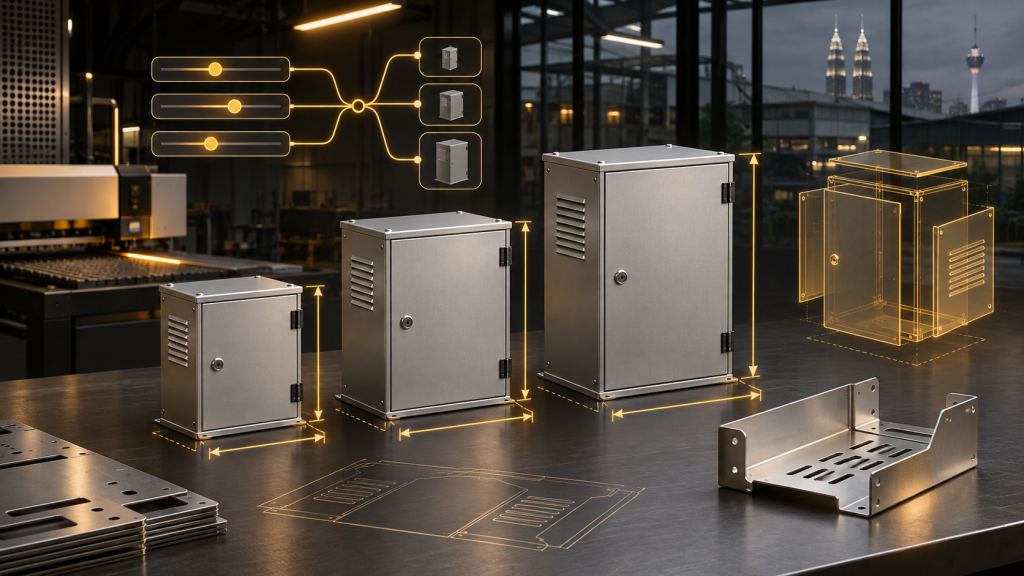
Kabinet dengan tiga pilihan lebar dan pengudaraan boleh menggunakan parameter lebar dan corak ventilasi. Peraturan boleh menolak kombinasi yang mengganggu ruang kelegaan. Ini contoh konsep, bukan reka bentuk yang telah diuji. Perlindungan kemasukan, haba, kekakuan, pengasingan elektrik dan piawaian berkaitan masih perlu disahkan.
Jejak audit
Gunakan kamus parameter dengan unit dan julat yang dibenarkan. Namakan peraturan berdasarkan tujuannya. Simpan log semakan dan bukti ujian. Tetapkan siapa boleh mengubah templat dan meluluskan lukisan. Sediakan proses pengecualian untuk permintaan pelanggan luar biasa dan sandarkan fail sumber. Jurutera lain mesti boleh mengulangi keputusan yang sama.
Senarai semak pembelian
Senaraikan keperluan pemodelan komponen, pemasangan, lukisan, variasi dan pengurusan data. Tentukan siapa membina serta menyelenggara peraturan dan bajet latihan. Semak hak langganan serta edisi Autodesk semasa; jangan mengandaikan semua sambungan disertakan. Sahkan keserasian komputer, akses fail dan keperluan kelulusan. Gunakan projek percubaan yang tidak sensitif.
Kesilapan lazim dan tindakan
Jangan automasikan proses yang belum diseragamkan. Berwaspada terhadap unit bercampur, ujian sempadan tidak lengkap, laluan fail tetap dan perubahan tanpa semakan. Mulakan dengan satu keluarga produk, bandingkan dengan lukisan asas dan kembangkan secara berperingkat. Rujuk dokumentasi Autodesk iLogic, halaman Inventor 2027 FXIT dan minta sebut harga berdasarkan keperluan sebenar.
简体中文 — 阅读翻译
为什么要标准化可配置设计
马来西亚机械制造企业经常生产相似的泵组、机箱和输送模块。尺寸与选项虽不同,工程设计原则仍须一致。Autodesk Inventor iLogic 可将重复的设计决策写入参数化模型,减少人工重复配置,但不能取代工程师的审核与批准。
iLogic 的功能与限制
Autodesk 文档说明 iLogic 支持规则、参数、条件逻辑和表单。规则可以控制尺寸、特征及零部件,但不能自行证明载荷安全、制造公差合理或客户规范已正确解释。工程师仍须检查图纸、材料、装配及制造约束。基于规则的自动化不等同于生成式人工智能。
实用实施流程
先选择风险较低、已有批准基准图纸的产品系列。定义尺寸、孔距、安装方向及材料等输入参数。编写有明确名称的规则,限制有效范围和选项依赖关系。测试正常值、边界值与无效组合。由负责工程师复核几何形状、物料清单及制造图纸,并记录规则版本与批准结果。
设备机箱示例
假设机箱提供三种宽度及可选通风孔,参数可控制宽度和通风布局,规则可拒绝违反间隙要求的组合。这只是说明性示例,并非经过验证的产品设计。防护等级、散热、结构刚度、电气隔离及适用标准仍须专业验证。
保持可追溯性
建立包含单位和允许范围的参数字典。按照用途命名规则,保存版本记录及测试证据。明确谁有权修改模板、谁负责批准图纸。特殊客户要求应走例外审批流程,不应直接修改生产规则。备份源文件并确认其他工程师可以重复得到相同结果。
采购检查清单
明确零件建模、装配、工程图、产品变型及数据管理的实际需求。指定规则编写和维护人员,安排培训。向官方核实当前 Autodesk 版本及订阅权益,勿假设所有扩展功能均已包含。检查工作站兼容性、共享文件权限和内部审批流程,并以非敏感项目开展试点。
常见错误与下一步
尚未标准化的流程不宜直接自动化。应避免单位混用、缺少边界测试、硬编码文件路径和未经审核的规则变更。先试行一个产品系列,与已批准图纸比较后逐步扩展。可参考 Autodesk iLogic 官方文档、FXIT Inventor 2027 产品页,并通过 询价页面 说明实际需求。
Updated 9 November 2026. A practical guide for Malaysian B2B engineering teams.
Why Malaysian manufacturers should standardise configurable designs
Malaysian machine builders often sell families of similar products: pump skids, enclosures, brackets and conveyor modules. The dimensions and options change, but the engineering intent should remain consistent. Autodesk Inventor iLogic design automation is one way to encode repeatable decisions in a parametric model instead of manually editing every variant. The objective is not to remove engineers from approval. It is to reduce repetitive configuration work while making design assumptions visible. This guide describes a controlled pilot for teams evaluating the Inventor 2027 product listed in the FXIT software catalogue.
What iLogic can and cannot automate
Autodesk documents iLogic rules, parameters, conditional logic, forms and interactions with design documents. A rule can set dimensions, switch features or components, and update related information. A rule is not an independent design engineer: it cannot establish whether an unsupported load case is safe, whether a fabrication tolerance is realistic or whether a customer specification has been interpreted correctly. Teams must verify drawing outputs, materials, fit and manufacturing constraints. Rules are deterministic instructions, not proof of AI-driven engineering. Avoid calling ordinary iLogic automation generative AI.
A practical Inventor iLogic workflow
First, select a low-risk family of components with documented variants and an approved baseline drawing. Second, identify the input parameters, such as width, height, hole spacing, mounting orientation and material selection. Third, write simple, named rules that enforce approved ranges and configuration dependencies. Fourth, generate a small test matrix containing typical values, boundary values and deliberately invalid combinations. Fifth, review regenerated geometry, bill-of-material changes and manufacturing drawings with a responsible engineer. Sixth, record the rule version and sign-off so future users can reproduce the approved configuration.
Example: an equipment enclosure
Consider an enclosure supplied in three widths with optional ventilation. A parameter may control the width; another may select a vent pattern. A rule can reject a vent option that conflicts with a required clearance. This is an illustrative workflow, not a tested design or a claim about a particular client’s equipment. Engineering review still needs to cover ingress protection, thermal behaviour, structural stiffness, electrical segregation and applicable standards. Do not let a configuration form silently substitute for the customer’s written specification or a professional review.
How to keep automation auditable
Use a shared parameter dictionary with units and allowed ranges. Name rules for the decision they enforce, not merely Rule1 or Rule2. Keep a revision log linking each approved model template to the test evidence. Make an exception path for unusual customer requests rather than editing rules in production without review. For multi-person teams, define who can change templates and who can release drawings. Back up source models and ensure that external references resolve on the intended workstations. A successful pilot is one that another engineer can repeat without relying on the original author.
Procurement checklist for Malaysian engineering teams
Before purchasing or expanding subscriptions, list the actual work: part modelling, large assemblies, drawing generation, configurable variants and data management. Ask which staff will author rules, who will maintain them, and whether training time is budgeted. Check the current Autodesk subscription entitlement and edition against the vendor’s documentation rather than assuming every bundled product or extension is included. Validate workstation compatibility, access to shared files and any approval requirements. A proof-of-concept should use a real but non-sensitive design and an agreed acceptance checklist.
Common mistakes and next steps
The most common mistake is automating a design process that is not yet standardised. Other risks include mixing millimetres and inches, missing boundary tests, hard-coded file paths, unreviewed rule edits and inconsistent drawing templates. Start with one configuration family, compare its output against the manually approved baseline and record the differences. If the result is reproducible, expand gradually. Autodesk’s iLogic rules documentation explains rule creation and execution. Explore Inventor 2027 and FXIT software, then request a quotation based on your workflow and licensing needs.
Questions to ask during the pilot review
Can a second engineer explain every input and reproduce the output without verbal guidance? Are invalid values rejected clearly? Does the drawing retain correct dimensions, notes and revision identifiers? Has the manufacturing team checked whether the proposed variation can actually be fabricated with available tooling? Can the team restore the previous approved configuration if a new rule causes an unexpected result? Record the answers before rolling out the template. If the team cannot answer these questions, extend the pilot rather than treating a successful model regeneration as proof that the workflow is production-ready.