November 9, 2026
Revit Cloud Worksharing Malaysia: BIM Collaboration Procurement Checklist

Bahasa Melayu — Baca terjemahan
Kerjasama BIM awan bermula dengan keputusan pembelian
Pasukan seni bina dan kejuruteraan Malaysia kerap berkongsi model Revit dengan perunding dan kontraktor. Awan memudahkan akses tetapi tidak menjamin penyelarasan BIM. Mulakan dengan mengenal pasti siapa perlu mengedit serentak, siapa hanya menyemak dan siapa meluluskan hasil. Autodesk membezakan model awan biasa, model perkongsian kerja dan model diterbitkan. Panduan ini bukan dakwaan bahawa undang-undang Malaysia mewajibkan platform tertentu.
Tiga senario kerjasama
Model awan tanpa perkongsian kerja sesuai untuk penyuntingan bergilir, manakala model dengan perkongsian kerja membolehkan pengguna Revit bekerjasama serentak. Model yang diterbitkan digunakan untuk semakan pihak berkepentingan. Dokumentasi Autodesk 2027 membezakan kelayakan langganan termasuk Revit Cloud Worksharing. Semak tawaran dan hak langganan terkini; lesen Revit sahaja tidak semestinya merangkumi semua ciri.
Tanggungjawab maklumat
Tetapkan pentadbir projek, penulis model, penyelaras disiplin dan penyemak. Putuskan siapa boleh mencipta folder, menjemput perunding, memuat naik model sumber dan mengeluarkan dokumen diluluskan. Tetapkan nama fail, pemilikan, semakan dan status kelulusan. Model draf tidak boleh disalah anggap sebagai dokumen kontrak yang telah dikeluarkan.
Projek percubaan terkawal
Gunakan projek kecil yang dibenarkan. Sahkan identiti Autodesk, hak langganan dan akses peserta. Sediakan folder, uji pembukaan serta penyegerakan model oleh dua pengguna sah, dan semak pautan model serta keserasian versi. Terbitkan paparan terpilih untuk penyemak tanpa Revit. Bezakan penyegerakan perubahan penulis daripada penerbitan untuk pihak lain.
Senarai semak pengeluaran
Semak versi, disiplin, tarikh, penerima dan status kelulusan. Laksanakan pemeriksaan geometri serta maklumat yang dipersetujui. Rekod isu koordinasi, pastikan paparan sepadan dengan daftar semakan dan beri penerima hak akses minimum. Simpan rekod kelulusan dan penghantaran. Sejarah versi automatik bukan pengganti penerimaan kontrak.
Keselamatan dan kesinambungan
Tanya lokasi data, kawalan pentadbir, proses membuang akses bekas pekerja dan tempoh penyimpanan. Semak syarat kontrak sebelum menjemput organisasi luar. Uji senario gangguan internet, muat naik tersilap dan eksport data. Penyimpanan awan tidak menggantikan tadbir urus maklumat atau rancangan pemulihan organisasi.
Maklumat untuk sebut harga
Nyatakan bilangan penulis serentak, penyemak, tempoh projek, pautan disiplin dan hasil serahan. Minta penjelasan terperinci tentang langganan perisian dan kerjasama. Sahkan dokumentasi Autodesk serta kelayakan terkini. Lihat produk Revit 2027 dan minta sebut harga berdasarkan keperluan pasukan BIM.
简体中文 — 阅读翻译
云端 BIM 协作从采购决策开始
马来西亚建筑与工程团队经常与顾问、承包商和业主交换 Revit 模型。云端访问并不自动等于有效的 BIM 协调。首先确认谁需要同时编辑、谁只负责查看,以及谁承担批准责任。Autodesk 区分普通云模型、工作共享模型和已发布模型。本文不是关于马来西亚法律强制使用某平台的声明。
了解三种协作模式
非工作共享云模型适合依次编辑;工作共享模型支持多位 Revit 用户同时协作;已发布模型用于利益相关者审阅。Autodesk 2027 文档区分相关订阅权益,包括完整并行协作所需的 Revit Cloud Worksharing。采购前必须核对最新报价和权益,不能假设普通 Revit 订阅包含全部功能。
先明确数据责任
指定项目管理员、模型编制人员、专业协调员和审阅者。明确谁能建立文件夹、邀请顾问、上传源模型以及发布获批交付成果。制定文件命名、所有权、修订和批准状态规则。协调草稿不应被误认为正式合同交付文件。
开展受控试点
选择获准使用数据的小型项目。核实各参与者的 Autodesk 身份、订阅权益及项目访问权限。建立文件夹结构,让两名获授权用户测试打开和同步工作共享模型,并检查链接模型及版本兼容性。向没有 Revit 的审阅者发布选定视图,明确同步编辑与发布审阅是不同操作。
发布前检查清单
逐项核实模型版本、专业、日期、目标接收者及批准状态。完成约定的几何和信息检查,解决或记录协调问题。确保发布视图与修订记录一致,接收者仅拥有必要权限。保留批准人与发送记录。自动版本历史不能替代合同验收。
安全与业务连续性
确认数据存放地区、管理员权限、离职人员撤权流程及保留期限。邀请外部组织前审查合同数据条款。测试断网、错误上传和数据导出等情况。云存储不能代替企业自己的信息治理与灾难恢复计划。敏感项目可能需要额外法律和安全审查。
询价应提供的信息
说明同时编辑人数、审阅者数量、项目期限、专业链接和交付成果。要求逐项列明软件及协作订阅,核实最新 Autodesk 官方文档和实际权益。可查看 FXIT 的 Revit 2027 产品页,并通过 询价页面 提交 BIM 团队需求。
Updated 9 November 2026. Practical guidance for Malaysian BIM procurement teams.
Cloud BIM collaboration starts with a procurement decision
Malaysian architectural and engineering teams frequently exchange Revit models across consultants, contractors and project owners. Moving files to the cloud can simplify access, but it does not automatically create coordinated BIM delivery. A Revit cloud worksharing Malaysia procurement review should begin with who needs to edit models simultaneously, who only needs to review published information, and who is accountable for approvals. Autodesk distinguishes ordinary cloud models from workshared models and published models. These are different workflows with different access and subscription considerations. This article is a practical buyer checklist, not a statement that any Malaysian project is legally required to use a particular platform.
Understand three collaboration scenarios
A non-workshared cloud model can support sequential editing, while a workshared cloud model supports multiple Revit users working concurrently. Published models are intended for stakeholder review rather than direct authoring. Autodesk’s 2027 documentation describes the subscription distinctions, including the separate Revit Cloud Worksharing entitlement for full concurrent collaboration. Product naming and package contents can change; confirm the actual subscription proposal and project region before purchasing. Avoid assuming that a Revit licence alone gives every team member every collaboration feature.
Define information responsibilities first
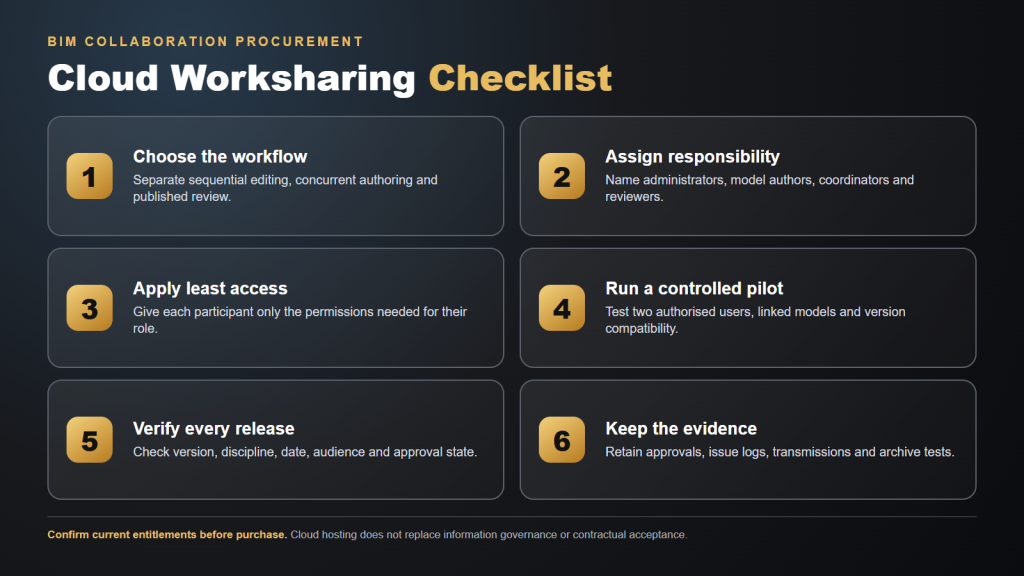
Before configuring a cloud project, name a project administrator, model authors, discipline coordinators and reviewers. Decide who creates folders, who invites consultants, who can upload source models, and who can issue approved deliverables. Establish naming conventions, file ownership and revision rules. A structural engineer should not accidentally overwrite an architectural release; equally, a reviewer should not mistake a draft coordination model for a contractual deliverable. Put approval status and issue ownership into the project execution plan, then check that platform permissions support those decisions.
Set up a controlled pilot
Choose a small live or representative project with permission to use its data. Confirm each participant’s Autodesk identity, entitlement and access to the correct cloud project. Create a sensible folder structure and test opening and synchronising a workshared model with two authorised users. Confirm how linked models are migrated and whether release compatibility matters. Then publish selected views for a reviewer who does not have Revit. Record the difference between synchronising author changes and publishing a model for others to see; these are not interchangeable actions.
A release checklist that prevents confusion
For every issue, verify model version, discipline, date, intended audience and approval state. Run agreed geometry and information checks before release. Resolve or document open coordination issues and make sure the issued views match the revision register. Confirm the recipient can access the files without unnecessary editing rights. Keep a record of who approved the release and what was transmitted. These controls matter even when the platform provides automatic version history, because software cannot determine contractual acceptance on its own.
Security and continuity questions for buyers
Ask where project data is hosted, which administrators control access, how departed users are removed and how long information must be retained. Review contractual data-handling requirements before inviting external organisations. Test the process for a temporarily unavailable internet connection, a user leaving the project and a mistaken upload. Discuss backups and export procedures with the platform administrator. Do not assume cloud hosting replaces the organisation’s own information governance or disaster-recovery planning. Sensitive projects may impose additional restrictions that require specific legal and security review.
What to request in a quotation
Specify the number of concurrent model authors, occasional reviewers, project duration, discipline links and expected deliverables. Ask for an itemised explanation of the software and collaboration subscriptions rather than only a headline price. Verify the latest vendor documentation and the exact entitlements before approving a purchase order. Autodesk’s cloud model options and cloud worksharing workflow are useful starting points. Review Revit 2027 in the FXIT catalogue and request a quote describing your BIM team size and collaboration needs.
Questions to ask at the project handover
Can the receiving organisation find the exact approved model revision and its related issue log? Does each consultant understand which information is shared for coordination and which documents are contractual deliverables? Is there a named owner for outstanding issues and a defined response period? Can administrators demonstrate that permissions are removed when project participation ends? Has the project team tested its export and archive procedure? These questions help prevent a technically functional cloud workspace from becoming an unreliable record of decisions. Document answers in the BIM execution plan or project information protocol.