November 10, 2026
AutoCAD 2027 Connected Sheet Set Manager: Malaysia Team Workflow Checklist

Bahasa Melayu — Baca artikel penuh
Mengapa pasukan CAD Malaysia perlu menilai set helaian bersambung
Bagi perunding dan firma kejuruteraan yang menghasilkan banyak lukisan, cabaran utama bukan sekadar melukis butiran tetapi mengawal nombor helaian, pemilik semakan, fail rujukan dan penerbitan. Connected Sheet Set Manager dalam AutoCAD 2027 boleh membantu menyusun aliran kerja lukisan bersama. Ia bukan jaminan kualiti reka bentuk atau pematuhan automatik. Pasukan masih bertanggungjawab menyemak semua lukisan sebelum dikeluarkan.
Perkara yang disahkan oleh dokumentasi Autodesk
Bantuan rasmi AutoCAD 2027 menerangkan bahawa Connected Sheet Set Manager menggantikan aliran kerja web terdahulu bermula AutoCAD 2026 Update 1.1. Set helaian boleh disimpan secara setempat, pada pemacu rangkaian atau awan yang disokong. Pengguna boleh menyunting fail DST awan secara bersama; fail awan dibuka terus daripada Forma Data Management dan bukannya folder Desktop Connector yang disegerakkan secara setempat. Perbezaan penerbitan dan fail sokongan perlu diperiksa mengikut versi.
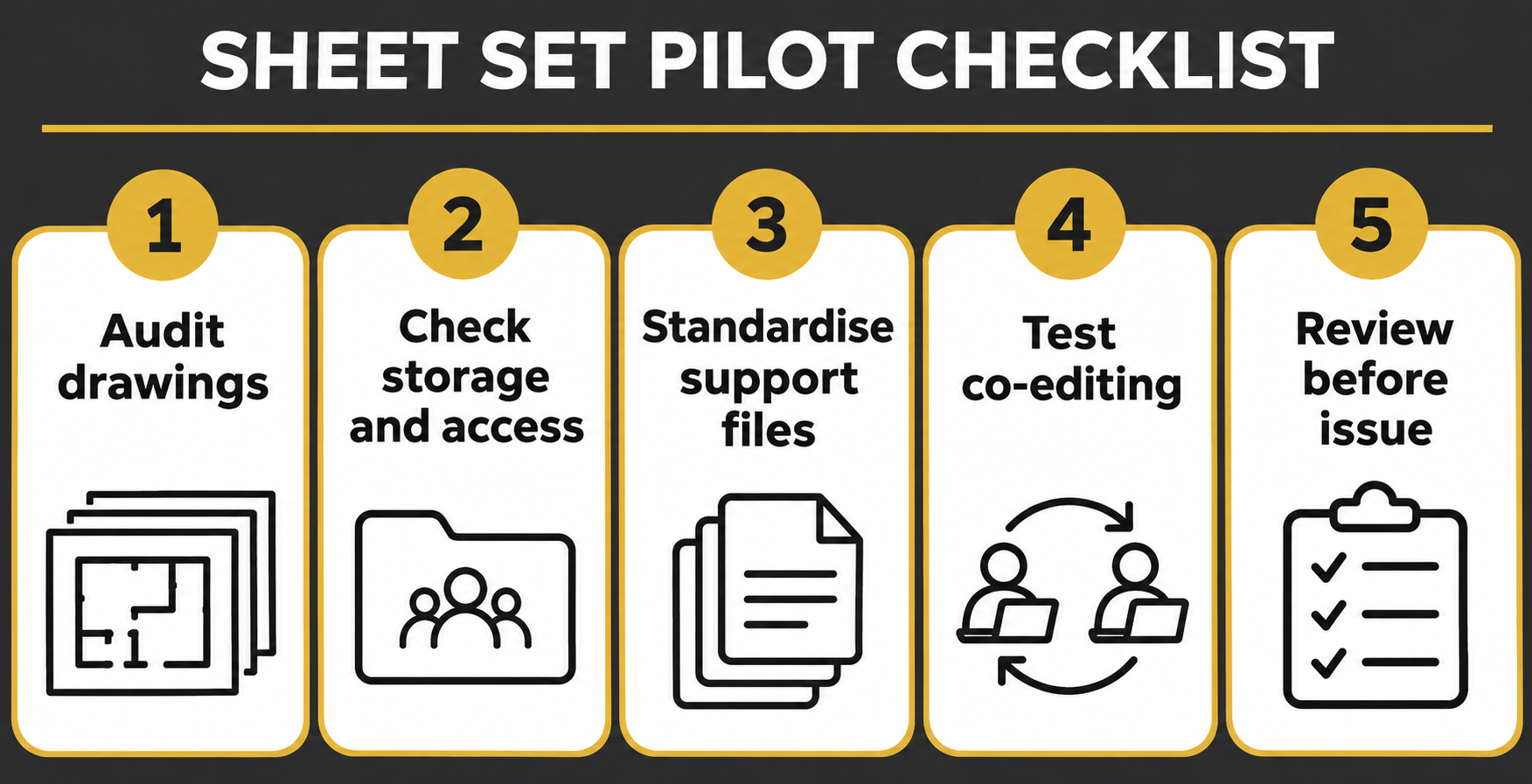
Langkah 1: audit pakej lukisan
Senaraikan lukisan, peraturan nombor helaian, blok tajuk, konvensyen semakan, rujukan luaran, fon dan gaya plot. Asingkan fail reka bentuk daripada helaian yang telah dikeluarkan. Tentukan siapa boleh mengubah set helaian utama. Uji projek kecil dahulu dan rekod proses sedia ada sebelum menilai peningkatan.
Langkah 2: pilih lokasi fail DST
Pilih storan setempat, rangkaian atau awan berdasarkan keperluan pasukan. Semak hak akses, sambungan, sandaran, pemilikan fail dan syarat lokasi data dalam kontrak. Penyuntingan bersama tidak menggantikan kawalan kebenaran atau pelan pemulihan. Uji gangguan sambungan dan sahkan hak penggunaan produk serta perkhidmatan awan sebelum pembelian.
Langkah 3: seragamkan fail sokongan dan penerbitan
Tetapkan templat, blok tajuk, nama fail, xref, gaya plot CTB atau STB, fon dan folder keluaran. Buat ujian sebenar: tambah helaian, ubah tajuk, terbitkan PDF dan bandingkan dengan piawaian pejabat. Sahkan maklumat blok tajuk dalam PDF, bukan hanya pratonton. Simpan set keluaran yang diluluskan tanpa perubahan.
Langkah 4: uji penyuntingan bersama dan pemulihan
Minta dua pengguna berlesen membuka set helaian awan yang sama, menambah helaian berasingan, menyemak kemas kini dan menutup sesi. Semak pemilik kunci fail dan kesan kehilangan sambungan. Autodesk menerangkan bahawa sesi tidak aktif boleh tamat tempoh dan masa membuka kunci bergantung pada cara sesi ditutup. Sediakan prosedur menangani kunci lama dan konflik semakan tanpa memadam fail projek secara sewenang-wenangnya.
Langkah 5: kelulusan manusia sebelum keluaran
Aliran kerja bersambung membantu mengatur maklumat tetapi tidak mengesahkan dimensi, nota, pengiraan kejuruteraan atau arahan pelanggan. Tetapkan penyemak dan pelulus. Periksa blok tajuk, bilangan helaian, awan semakan, kebolehbacaan PDF dan rujukan. Bandingkan daftar lukisan dengan surat penghantaran dan arkibkan keluaran yang diluluskan. Sahkan keperluan kontrak atau projek sebenar.
Senarai semak pembeli dan tindakan seterusnya
Semak keperluan AutoCAD penuh, hak kolaborasi awan, keserasian versi dan pentadbiran fail sokongan. Jangan anggap AutoCAD LT mempunyai fungsi yang sama. FXIT menyenaraikan AutoCAD 2027 dan AutoCAD LT 2027. Rujuk katalog perisian dan halaman permintaan sebut harga untuk perbincangan lesen. Panduan ini bukan jaminan penjimatan atau kewajipan kerajaan Malaysia.
Rujukan rasmi dan nota semakan
Sumber: bantuan rasmi Autodesk AutoCAD 2027 Connected Sheet Set Manager. Disemak pada 10 November 2026. Hak lesen dan konfigurasi awan perlu disahkan semula sebelum pembelian.
简体中文 — 阅读全文
马来西亚 CAD 团队为何应评估连接式图纸集
对需要交付大量工程图纸的顾问公司而言,难点不只是绘图,还包括图号、修订责任、外部参照及发布管理。AutoCAD 2027 Connected Sheet Set Manager 可帮助组织共享图纸流程,但不能自动保证设计质量或合规。每张图纸发布前仍须由团队审核。
Autodesk 官方资料确认的功能
AutoCAD 2027 官方帮助指出,Connected Sheet Set Manager 自 AutoCAD 2026 Update 1.1 起取代先前的网页图纸集工作方式。图纸集可存于本机、共享网络或受支持的云端。云端 DST 文件支持多人协同编辑,并直接从 Forma Data Management 打开,而非从本地同步的 Desktop Connector 文件夹打开。发布及支持文件的行为应按版本核实。
步骤一:审核图纸交付包
列出所有图纸、编号规则、标题栏、修订惯例、外部参照、字体及打印样式。将设计文件与正式发布图纸分开,指定主图纸集的修改权限。先使用小型试点项目,记录原有流程,再评估实际改善。
步骤二:确定 DST 文件存放位置
按团队需求选择本机、网络或云端存储。核对访问权限、连接稳定性、备份、文件所有权和合同中的数据位置要求。协同编辑不等于权限管理或灾难恢复。测试断线情况,并在采购前确认软件及云服务授权。
步骤三:统一支持文件与发布标准
统一模板、标题栏、命名、外部参照、CTB 或 STB 打印样式、字体及发布目录。进行真实测试:新增图纸、修改标题、输出 PDF,并与办公室标准比较。检查 PDF 内的标题栏数据,不应只依赖编辑器预览。已批准的发布版本应保持不可随意修改。
步骤四:测试协同编辑与恢复
安排两名持有适当许可证的用户打开同一个云端图纸集,分别新增图纸、检查更新并结束会话。核对文件锁定状态和断线后的行为。Autodesk 说明闲置会话可能超时,保存与解锁时间也取决于关闭方式。制定处理过期锁定及修订冲突的流程,避免随意删除项目文件。
步骤五:发布前必须人工审批
连接式流程可以组织资料,却无法替代尺寸、注释、工程计算和客户指示的审核。指定检查人与批准人,核对标题栏、图纸数量、修订标记、PDF 可读性及外部参照。将发布清单与传送记录比对,并归档获批版本。合同及项目要求须逐项核实。
采购检查清单及下一步
确认是否需要完整 AutoCAD、云端协作授权、版本兼容性及支持文件管理。不要假设 AutoCAD LT 的功能完全相同。FXIT 网站列有 AutoCAD 2027 和 AutoCAD LT 2027,可查看软件目录及索取报价页面。本文不保证节省成本,也不表示马来西亚政府强制采用此流程。
官方资料及复核说明
来源:Autodesk AutoCAD 2027 Connected Sheet Set Manager 官方帮助。核实日期:2026 年 11 月 10 日。采购前须再次确认许可证及云端配置。
English article
Why Malaysian CAD teams should review connected sheet sets
For consultants and engineering firms producing dozens of drawings, the difficult part is often not drawing one detail: it is controlling sheet numbers, revision ownership, reference files and publishing. AutoCAD 2027 Connected Sheet Set Manager Malaysia is a useful search topic for teams planning a controlled shared drawing workflow. The objective is to reduce confusion between people editing sheets, not to promise automatic design quality or compliance. A sheet set is a structured collection of drawing sheets and related metadata; the team still owns checking every drawing before issue.
What Autodesk documentation actually confirms
Autodesk’s current AutoCAD 2027 help says the Connected Sheet Set Manager replaced the earlier web-based sheet-set workflow in AutoCAD 2026 Update 1.1 and later. It can open sheet sets stored locally, on shared network drives or in the cloud, and supports co-editing a cloud-based DST sheet-set file. Autodesk says cloud DST files are opened directly from Forma Data Management, rather than from a locally synchronised Desktop Connector folder. This distinction matters when setting up office procedures. Autodesk also documents differences in publishing and support-file handling, so do not assume a legacy tutorial applies unchanged.
Step 1: audit your drawing package
List the active project drawings, sheet numbering rules, title blocks, revision conventions, external references, fonts and plot styles. Separate design files from issued sheets and record who is allowed to change the master sheet set. Identify any subcontractor files that must remain read-only. A small pilot project is safer than migrating a live tender package on its submission day. Record the existing process so that any claimed improvement can be measured rather than guessed.
Step 2: decide where the DST file lives
Choose local, network or supported cloud storage based on the team, not on fashion. Check access entitlements, connectivity, backup arrangements, file ownership and contractual data-location requirements. Autodesk describes collaborative editing for cloud-based DST files, but this does not remove the need for permission management or a recovery plan. For a mixed office-and-site team, test a temporary loss of connectivity and document how people should resume safely. Confirm product and cloud service entitlements with the vendor before procurement.
Step 3: standardise support files and publishing
Agree on templates, title blocks, naming, xrefs, CTB or STB plot styles, fonts and issue folders. Autodesk’s Connected Sheet Set Manager documentation explains connected support files and different publishing paths. Run an actual test: create a sheet, change its title, publish a sample PDF and compare the output with the approved office standard. If a title block is linked to sheet properties, verify the value in the resulting PDF rather than trusting the editor preview. Keep the approved issued set immutable.
Step 4: test co-editing and recovery
Invite two licensed users to a controlled pilot. Ask them to open the same cloud sheet set, add separate sheets, review each other’s updates and close the session. Check how lock ownership appears and how the session behaves when one workstation disconnects. Autodesk notes that inactive sessions can time out and that saving or unlocking may depend on how the last participant closes the sheet set. Record an escalation procedure for stale locks and conflicting revisions; do not solve conflicts by casually deleting live project files.
Step 5: put human approval before release
A connected workflow helps organise information, but does not verify dimensions, drawing notes, engineering calculations or the latest client instruction. Establish a checker and approver for every issue. Review title blocks, sheet counts, revision clouds, PDF readability and reference resolution. Compare the published register with the transmittal. Archive the approved issue and log subsequent changes. For regulated or contractual deliverables, confirm the exact employer information requirements and project specification rather than assuming software settings satisfy them.
Buyer checklist and next action
Before selecting a licence, ask whether the project needs full AutoCAD functionality, what cloud collaboration entitlement is included, whether all contributors use compatible releases, and who will administer storage and support files. Do not assume AutoCAD LT offers identical sheet-set capabilities; compare the current edition-specific documentation. FXIT lists AutoCAD 2027 and AutoCAD LT 2027 in its live software catalogue. Review FXIT software catalogue and request a quotation for an edition and workflow discussion. This article is practical guidance, not a guarantee of cost savings, certification or a mandatory Malaysian government workflow.
Official reference and review note
Autodesk AutoCAD 2027 Connected Sheet Set Manager help. Verified 10 November 2026. Product and cloud entitlements may change; confirm the exact subscription and deployment configuration before purchase.