November 11, 2026
Inventor Model States for Malaysian Manufacturers: A Product Variant Review Checklist
Bahasa Melayu — Baca artikel penuh
Mengapa menilai varian produk?
Pengilang sering menghasilkan produk serupa dalam beberapa saiz atau konfigurasi. Model States dalam Autodesk Inventor boleh mewakili saiz, peringkat pembuatan atau tahap pemudahan yang berbeza dalam satu fail komponen atau pemasangan. Setiap keadaan boleh mempunyai parameter, iProperties dan maklumat bil bahan (BOM) sendiri. Ciri ini membantu penyusunan tetapi tidak menjamin reka bentuk atau senarai pembelian yang betul.
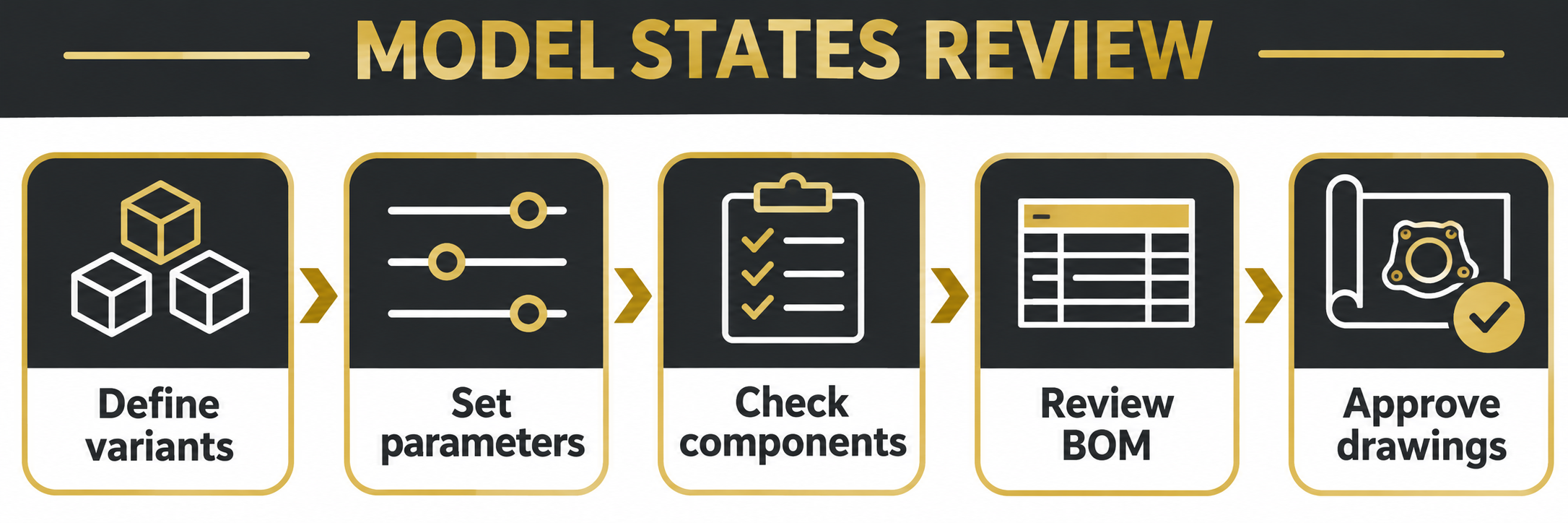
1. Tentukan varian
Mulakan dengan keluarga produk yang diluluskan dan projek perintis kecil. Senaraikan tujuan, dimensi, komponen pilihan, nombor bahagian dan orang yang meluluskan setiap varian. Asingkan keperluan pelanggan daripada pilihan standard dan rekod proses keluaran sedia ada.
2. Tetapkan dan semak Model States
Gunakan nama yang jelas dan sahkan parameter serta komponen yang disekat bagi setiap keadaan. Autodesk mengingatkan bahawa skop suntingan penting: semak sama ada perubahan terpakai pada keadaan aktif atau semua keadaan. Uji perubahan contoh, periksa keadaan yang terlibat dan ikut prosedur sandaran serta kawalan dokumen.
3. Semak BOM
Bandingkan BOM setiap keadaan dengan senarai bahagian yang disemak secara bebas. Periksa kuantiti, nombor bahagian, penerangan dan pilihan. Jangan anggap perubahan model menghasilkan senarai perolehan yang siap secara automatik. Tetapkan cara pembelian dan pengeluaran mengenal pasti varian yang diluluskan.
4. Semak lukisan dan keluaran
Inventor membenarkan keadaan model dipilih untuk paparan lukisan. Pastikan paparan, dimensi, nota, blok tajuk dan senarai bahagian sepadan dengan konfigurasi yang diluluskan. Minta penyemak kedua membandingkan model, BOM dan lukisan; arkibkan keluaran serta rekod perubahan.
Pilihan dan tindakan seterusnya
Jika varian memerlukan fail berasingan untuk pengurusan dan keluaran, Autodesk mencadangkan supaya iParts dan iAssemblies dipertimbangkan. Bandingkan kawalan revisi, sistem hiliran, lesen dan kemahiran pasukan; uji sebelum memindahkan projek pengeluaran. Rujuk katalog perisian FXIT atau minta sebut harga. Panduan ini tidak menggantikan kelulusan kejuruteraan. Sumber: Autodesk About Model States, disemak 11 November 2026.
Contoh, perintis dan tanggungjawab
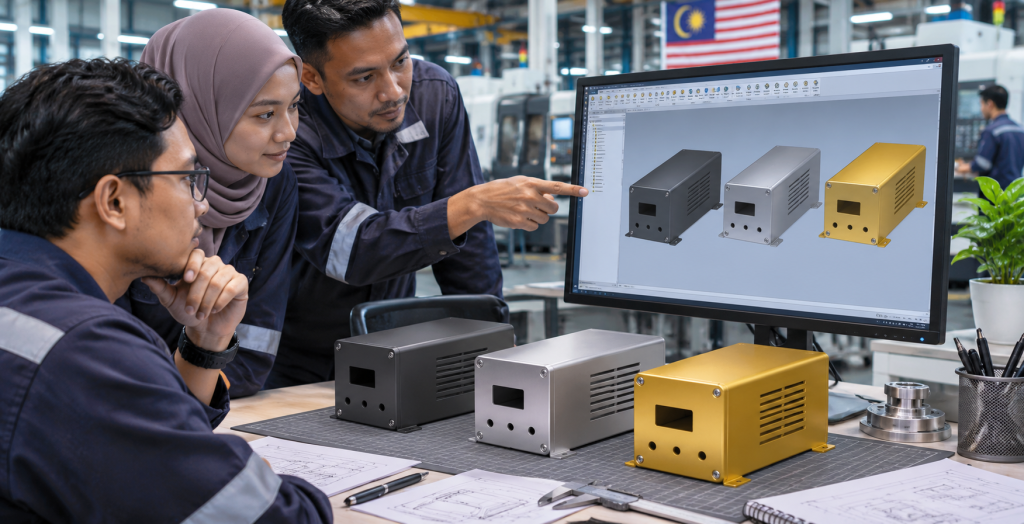
Contoh ilustrasi: tentukan tiga saiz kotak, dimensi, perkakasan pilihan dan nombor bahagian. Semak sama ada proses keluaran dikongsi; jika kawalan berasingan diperlukan, pertimbangkan fail berasingan. Dalam salinan terkawal, ubah kedudukan lubang dan catat skop suntingan. Bandingkan setiap keadaan, lukisan dan senarai; uji juga perubahan bagi satu keadaan sahaja. Tetapkan pemilik model, penyemak BOM dan pelulus, serta cara melapor percanggahan. Model State tidak menggantikan nombor bahagian atau membuktikan BOM betul. Uji kesan hiliran sebelum pelaksanaan.
Rekod selepas perintis
Simpan log bagi setiap varian: keadaan dipilih, dimensi, komponen, identiti, revisi lukisan, tarikh dan penyemak. Rekod cara BOM dibandingkan dengan rekod pembelian, perbezaan, pembetulan dan kelulusan. Tetapkan bila lukisan serta senarai menjadi rujukan pesanan kerja dan bagaimana revisi dimaklumkan kepada pengeluaran. Selesaikan had sistem hiliran sebelum pelaksanaan; semak kebenaran dan sandaran mengikut prosedur organisasi. Kejayaan bermakna konfigurasi keluaran dapat dikenal pasti dan dikawal, bukan sekadar model boleh dibuka.
Sebelum keluaran rasmi, pihak bertanggungjawab perlu mengesahkan isu tertunggak dan rekod kelulusan.
简体中文 — 阅读全文
为何检查产品变型?
制造商常需生产不同尺寸或配置的相似产品。Autodesk Inventor 的 Model States 可在同一零件或装配文件中表示不同尺寸、制造阶段或简化程度。每种状态可具有自己的参数、iProperties 和材料清单(BOM)信息。它有助于组织资料,但不能保证设计或采购清单正确。
1. 明确变型
从已批准的产品系列和小型试点开始。列出每种变型的用途、尺寸、可选组件、零件号和审批责任人。区分客户特殊要求与标准选项,并记录现有文件发布流程。
2. 设置并检查状态
使用清晰名称,核对每种状态的参数及被抑制组件。Autodesk 提醒用户注意编辑范围:修改可能针对当前状态或所有状态。先测试代表性更改,检查受影响状态,并遵循备份和文件控制规定。
3. 核对 BOM
将每种状态的 BOM 与独立检查的零件清单比较,核对数量、零件号、描述和可选组件。不要假设模型变更会自动生成可采购清单。明确采购和生产如何识别已批准变型,发布前解决差异。
4. 检查图纸并发布
Inventor 允许为图纸视图选择模型状态。核对视图、尺寸、注释、标题栏和零件清单是否对应批准的配置。安排第二人比较模型、BOM 与图纸,归档批准版本并记录后续变更。
选择方法和下一步
若变型需要分别管理和发布文件,Autodesk 建议考虑 iParts 和 iAssemblies。比较修订控制、下游系统、许可和团队技能,在迁移生产项目之前测试代表性文件。可查看 FXIT 软件目录或索取报价。本指南不能代替工程审批。来源:Autodesk About Model States,核查于 2026 年 11 月 11 日。
示例、试点与责任
例如,为机箱定义三种尺寸、尺寸参数、可选安装件及零件号。检查是否共用发布流程;若需要独立控制,可考虑单独文件。在受控副本中修改安装孔位置并记录编辑范围,比较各状态、图纸与导出清单,再测试只影响单一状态的变更。指定模型负责人、BOM 检查人和审批人,并确定差异报告方式。Model State 不能取代零件编号,也不能证明 BOM 正确;部署前应测试下游影响。
试点后的记录
为每个变型记录所选状态、预期尺寸、组件、识别信息、图纸修订、日期及检查人,并记录 BOM 与采购记录的比较、差异、修正和批准。明确何时将图纸及清单作为工单依据,以及如何向生产传达后续修订。部署前解决下游系统无法可靠区分配置的问题,并按组织流程检查权限与备份。试点成功应以能识别和控制已发布配置为准,而不只是模型能够打开。
在正式发布前,应由负责人员确认所有未解决的问题和审批记录。
Why review product variants?
Manufacturers often need similar products in several sizes or configurations. Recreating every assembly can complicate revisions and handover. Autodesk Inventor Model States can represent different sizes, manufacturing stages or simplification levels in a single part or assembly file. Each state can have its own parameters, iProperties and bill-of-materials information. This is an organisational tool, not a guarantee that a design or purchasing list is correct.
1. Define the variants
Start with an approved product family and a small pilot. List the variants, their purpose, dimensions, optional components, part numbers and the person responsible for approval. Separate customer-specific requirements from standard options. Record how the current files and drawings are released before changing the process.
2. Set and check model states
Create clearly named states and verify the intended parameters and component suppression for each. Autodesk notes that the edit scope matters: check whether a change applies to the active state or all states before editing. Test a representative change and inspect every affected state. Maintain a backup and follow the organisation’s document-control rules.
3. Review the bill of materials
Compare the BOM for each state with an independently checked parts list. Check quantities, part numbers, descriptions and optional components. Do not assume a model change has automatically produced a procurement-ready list. Agree how purchasing and production will identify the approved variant, and investigate discrepancies before release.
4. Check drawings and release
Inventor allows a model state to be selected for a drawing view. Confirm that each view shows the intended state and that dimensions, notes, title blocks and parts lists match the approved configuration. A second person should compare the drawing, model and BOM. Archive the approved issue and record later changes.
Choosing the right approach
If variants need separately managed and released files, Autodesk suggests considering iParts and iAssemblies. Compare that approach with Model States against your revision control, downstream systems, licensing and team skills. Test with representative files before migrating an active production project. Confirm software version and entitlement before purchasing.
Next step and source
Discuss a suitable workflow through the FXIT software catalogue or request a quotation. This guide does not replace engineering approval. Reference: Autodesk: About Model States, checked 11 November 2026.
Example and pilot checks
Consider an illustrative enclosure offered in small, medium and large sizes. Record the dimensions, optional mounting hardware, part numbers and approval responsibility for each. Check whether the variants share one release process. If a variant needs separate file control, compare an independent-file approach before choosing a method.
In a controlled copy, change a mounting-hole position and record the edit scope. Compare every affected state, the drawing views and exported lists. Then test a change intended for one state only. Keep an approved baseline and document results. This example is not a measured customer outcome.
Ownership and common questions
Assign a model owner, BOM reviewer and release approver. Agree file naming, storage and how production reports discrepancies. A model state does not replace a part number or prove a BOM correct. Check downstream references in a copy and roll out only after a representative pilot. Keep the current method when it provides better control for a particular product family.
What to record after the pilot
Keep a small review log alongside the test files. For each variant, record the selected state, expected dimensions, components and identifying information, the drawing revision and the date checked. Note who performed the check and how the resulting BOM was compared with the purchasing record. Capture any difference between the intended and actual output, the action taken and who approved the correction. This record helps a second reviewer repeat the test without relying on memory.
Discuss how changes will move between engineering and production. Establish a point at which an approved drawing and list become the reference for a work order, and decide how a later revision is communicated. If a downstream system cannot distinguish the configurations reliably, resolve that limitation before rollout. Review permissions and backups using the organisation’s existing procedures. A pilot is successful when the team can identify and control each released configuration, not merely when a model opens.
Before final release, the responsible team should confirm that open issues have owners and the required approvals are recorded.