November 11, 2026
Civil 3D Pressure Networks for Malaysian Water Projects: A Review Checklist

Bahasa Melayu — Baca artikel penuh
Fungsi rangkaian tekanan
Rangkaian tekanan Civil 3D boleh mewakili sistem paip tekanan tiga dimensi seperti penghantaran air. Autodesk menerangkan laluan paip berasaskan jajaran yang boleh ditakrif dan dimodelkan dalam pelan serta profil. Model membantu penyelarasan tetapi tidak membuktikan kecukupan hidraulik, kelulusan pihak berkuasa atau keselamatan pembinaan. Jurutera berkelayakan tetap bertanggungjawab.
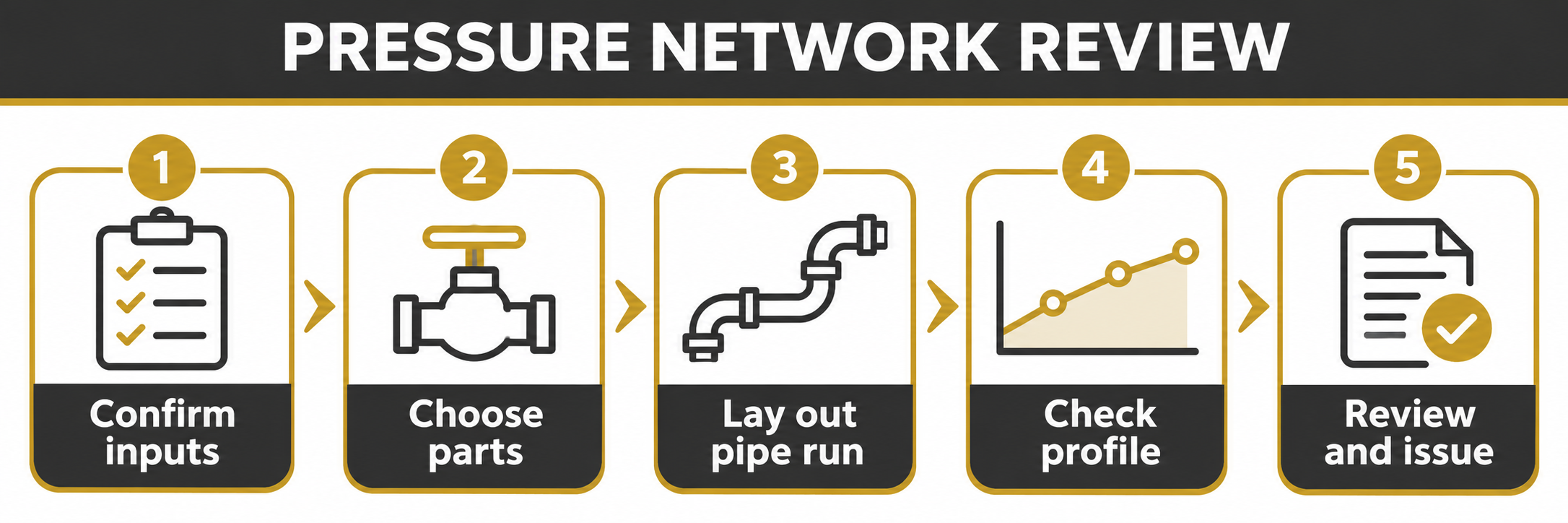
1. Sahkan input projek
Kumpulkan ukur terkini, sistem koordinat, permukaan tanah, jajaran, maklumat utiliti dan keperluan pelanggan. Rekod asal dan tarikh setiap input, kenal pasti maklumat yang tiada dan kawal kemas kini. Sahkan utiliti sedia ada melalui proses penyiasatan projek yang diluluskan.
2. Pilih bahagian dan andaian
Semak senarai bahagian, saiz dan bahan paip, permukaan rujukan, litupan dan jajaran berdasarkan spesifikasi. Autodesk mendokumenkan input ini semasa mencipta laluan paip. Bahagian dalam katalog tidak semestinya diluluskan atau sesuai; sahkan komponen dan maklumat pembekal secara bebas.
3. Jalankan perintis terkawal
Lukis laluan pendek yang mewakili keadaan projek dan semak paip serta bengkok yang terhasil. Autodesk menjelaskan bahawa perubahan laluan boleh mengemas kini bahagian yang bersambung. Uji perubahan pada salinan dan semak sambungan; simpan garis asas yang diluluskan serta andaian.
4. Semak pelan dan profil
Periksa laluan, aras, lintasan, litupan, sambungan dan kebolehbinaan. Profil laluan berasaskan jajaran tidak boleh disunting dalam paparan profil yang menggunakan jajaran lain. Jika permukaan rujukan berubah, semak reka bentuk sekali lagi.
5. Semak dan keluarkan
Gunakan pemeriksaan reka bentuk dan kedalaman sebagai bantuan, kemudian siasat hasilnya. Bandingkan lukisan, label, jadual dan model dengan pengiraan serta keperluan projek yang diluluskan. Tetapkan penyemak dan pelulus, rekod isu dan arkibkan keluaran. Analisis hidraulik, pengesahan tapak dan keperluan pihak berkuasa kekal berasingan. Semak versi, lesen dan latihan; rujuk FXIT untuk sebut harga. Sumber Autodesk About Pressure Networks, disemak 11 November 2026.
Contoh lintasan dan tanggungjawab
Pilih laluan perintis yang melintasi jalan dan utiliti. Rekod andaian permukaan, jajaran, bahan dan sumber maklumat; jurutera mesti mengesahkan kedalaman, jarak, beban dan kaedah pembinaan sebenar. Pada salinan terkawal, ubah laluan dan semak paip, bengkok, sambungan, label dan jadual dalam pelan serta profil. Uji perubahan permukaan dan rekod semakan manual. Tetapkan pemilik model, jurutera, penyelaras dan penyemak. Katalog tidak membuktikan kesesuaian; semakan kedalaman bergantung pada input dan had, dan model tidak menggantikan siasatan tapak.
Rekod semakan dan serahan
Simpan daftar yang mengenal pasti versi ukur dan permukaan, senarai bahagian, andaian, lukisan dan revisi model. Rekod penyemak, tarikh, pemeriksaan, isu terbuka dan pemilik tindakan. Tandakan ketidakpastian utiliti atau aras dan hubungkannya dengan siasatan yang diluluskan; jangan anggap jarak selamat tanpa pengesahan. Sebelum serahan, bandingkan model, pelan, profil, jadual dan pengiraan; sahkan koordinat serta versi dengan penerima dan arkibkan pakej mengikut kawalan dokumen. Jika input berubah, nilai semula pemeriksaan dan kelulusan yang perlu diulang.
Sebelum keluaran rasmi, pihak bertanggungjawab perlu mengesahkan isu tertunggak dan rekod kelulusan.
简体中文 — 阅读全文
压力管网的用途
Civil 3D 压力管网可用于表示输水等三维压力管道系统。Autodesk 说明可在平面和纵断面中定义及建模基于路径的管线。模型有助于协调,但不能证明水力设计充分、获得主管部门批准或保证施工安全;合格工程师仍须负责设计。
1. 确认项目输入
收集最新测量、坐标系统、地表、路线、地下管线资料和客户要求。记录每项资料的来源及日期,识别缺失信息并控制更新。现有管线资料可能不完整,应按项目批准的调查流程核实。
2. 选择部件和设计假设
依据设计任务和规范检查部件清单、管径、材料、参考地表、覆土和路线。Autodesk 将这些列为创建管线时的输入。目录中有某部件不代表该项目已批准使用;应独立核实部件和供应商资料。
3. 进行受控试点
先布置一段具有代表性的短管线,检查生成的管道和弯头。Autodesk 说明路径变化可能更新连接部件。应在副本中测试修改,检查弯头和连接处的影响,并保留批准的基线和假设记录。
4. 检查平面及纵断面
检查路线、标高、交叉、覆土、连接点和可施工性。基于路径的管线纵断面若放在关联不同路线的纵断面视图中,不能编辑。参考地表变化后,应重新检查设计,不可假设原检查仍然有效。
5. 审核并发布
将设计与深度检查作为辅助,并调查检查结果。把图纸、标注、表格和模型与批准的工程计算及项目要求比较。指定检查人和审批人,记录未解决问题并归档批准版本。水力分析、现场核实及主管部门要求仍须另行处理。部署前确认版本、许可、数据管理和培训;可向 FXIT 索取报价。来源:Autodesk About Pressure Networks,核查于 2026 年 11 月 11 日。
道路交叉示例与责任
试点可选择穿越道路及既有管线的短路线,记录假设地表、路线、材料和资料来源;实际深度、净距、荷载及施工要求须由专业人员确认。在受控副本中修改路径,检查管道、弯头、连接、标注、表格及平纵断面,再测试参考地表变化并记录人工检查。指定模型负责人、工程师、协调人和检查人。目录不能证明部件适用;深度检查依赖输入与限值,模型也不能取代现场调查。
审核记录与交付
建立登记表,记录测量和地表版本、部件清单、假设、图纸与模型修订,以及检查人、日期、检查项目、未解决问题和负责人。明确标记既有管线或地面标高的不确定性,并关联批准的调查流程;不得把未知净距当成已满足要求。交付前核对模型、平面、纵断面、表格及独立工程计算,与接收方确认坐标和版本,按项目文件控制流程归档。输入发生变化时,应评估需要重做的检查和审批。
在正式发布前,应由负责人员确认所有未解决的问题和审批记录。
What pressure networks can help model
Civil 3D pressure networks can represent three-dimensional pressure-pipe systems such as water transmission networks. Autodesk describes path-based pipe runs that can be defined and modelled in plan and profile. A model helps organise coordination; it does not establish hydraulic adequacy, authority approval or construction safety. Qualified engineers remain responsible for design and project requirements.
1. Confirm project inputs
Gather the latest survey, coordinate system, ground surface, alignment, utility information and client requirements. Record the origin and date of each input, identify missing information and agree how updates will be controlled. Existing services may be incomplete or inaccurate; confirm them through the project’s approved investigation process.
2. Select parts and layout assumptions
Review the available parts list, pipe size and material, reference surface, cover and alignment against the design brief and specifications. Autodesk documents these inputs when creating a pipe run. Catalogue availability is not proof that a component is approved or suitable for a particular project. Confirm components and supplier information independently.
3. Create a controlled pilot
Lay out a short representative pipe run and inspect the generated pipes and bends. Autodesk explains that modifying a path can update connected parts. Test a change on a copy and review the consequences at bends and connections. Keep an approved baseline and document assumptions so colleagues can reproduce the review.
4. Review plan and profile
Examine the route and elevations in plan and profile, including crossings, cover, connection points and constructability. Autodesk notes that path-based pipe-run profiles are not editable in a profile view associated with a different alignment. If the reference surface changes, review the resulting design again rather than assuming the original checks remain valid.
5. Check and issue
Use available design and depth checks as aids, then investigate each result. Compare drawings, labels, schedules and model information with the approved engineering calculations and project requirements. Assign a checker and approver, record unresolved issues and archive the approved issue. Hydraulic analysis, site verification and applicable authority requirements remain separate responsibilities.
Next step and source
Confirm the installed Civil 3D version, licence, data-management process and team training before deployment. Explore the FXIT software catalogue or request a quotation. Reference: Autodesk: About Pressure Networks, checked 11 November 2026.
Example: a road crossing
For an illustrative pilot, select a short run crossing a road and an existing utility. Record the assumed surface, alignment, material and source of the utility information. These are example inputs, not design specifications. Responsible professionals must confirm actual depths, clearances, loads and construction requirements with the relevant parties.
Test change and coordination
In a controlled copy, modify the path and inspect connected pipes and bends. Compare plan and profile, connections, labels and schedules. Replace or update the reference surface and review what changes. Record any manual checks. A successful model update does not establish hydraulic or structural adequacy.
Ownership and common questions
Nominate the model owner, engineer, utility coordinator and reviewer. Agree who controls the surface and parts list, how changes are communicated, and which version is issued. A catalogue entry does not establish component suitability. A depth check is only as useful as its inputs and limits; the engineer must assess the project requirements. A model does not replace field investigation.
Document the review and handover
Keep a register for the pilot that identifies the source survey and surface versions, parts list, design assumptions, drawings and model revision. Record the reviewer, date, checks performed, open issues and the person responsible for closing each issue. Where existing utilities or ground levels are uncertain, label those assumptions clearly and link them to the approved investigation and verification process. Do not convert uncertainty into an assumed clearance.
Before handover, compare the issued model with plan and profile drawings, schedules and separate engineering calculations. Agree the coordinate reference and file version with recipients. Record what changed since the previous issue and retain the approved package according to the project’s document-control procedure. If a reference surface, route or specification changes later, assess which checks and approvals need to be repeated. This record supports coordination but does not replace professional judgement or any required authority submission.
Before final release, the responsible team should confirm that open issues have owners and the required approvals are recorded.