
November 24, 2026
Software Update Management for Malaysian SMEs: A Practical Patch Checklist

Bahasa Melayu
Jadikan kemas kini proses perniagaan
Kemas kini perisian boleh mengurangkan pendedahan kepada kelemahan diketahui, tetapi perubahan tergesa-gesa juga boleh mengganggu sistem. PKS Malaysia memerlukan keseimbangan antara segera, ujian dan pemulihan. NIST menerangkan pengurusan tampalan sebagai mengenal pasti, mengutamakan, mendapatkan, memasang dan mengesahkan kemas kini. Panduan ini bukan jaminan mengelakkan insiden siber.
Bina inventori aset
Senaraikan komputer riba, desktop, pelayan, peranti rangkaian dan aplikasi, termasuk pemilik, sistem operasi, versi dan status sokongan. Masukkan peranti jauh dan sistem yang jarang digunakan. Kenal pasti sistem yang menyimpan maklumat sensitif atau menyokong operasi penting. Tanpa inventori, syarikat mungkin terlepas get laluan atau aplikasi lama.
Utamakan pendedahan dan kesan
Semak nasihat pengeluar dan nilai sama ada sistem terdedah kepada internet, digunakan aktif, penting kepada perniagaan atau mempunyai kawalan sementara. Pertimbangkan kesan gangguan serta isu keselamatan. Tetapkan pemilik dan sasaran masa bagi setiap kemas kini. Percepat pembaikan mendesak melalui keputusan yang direkodkan; tidak semua kemas kini mempunyai risiko sama.
Gunakan sumber dipercayai
Dapatkan kemas kini melalui saluran pengeluar yang diluluskan dan sahkan sumber. Rekod versi terlibat serta syarat seperti sistem operasi disokong dan ruang cakera. Elakkan pautan muat turun tidak disahkan dalam e-mel. Jika produk tidak lagi disokong, rekod risiko dan rancang penggantian atau kawalan sementara dengan bantuan yang layak.
Uji sebelum pelaksanaan meluas
Uji pada kumpulan kecil wakil termasuk peranti yang menjalankan aplikasi perakaunan, reka bentuk atau pengeluaran penting. Selepas kemas kini, semak log masuk, pencetakan, rangkaian, integrasi dan aliran kerja utama. Rujuk keserasian pengeluar dan rekod keputusan. Ujian tidak meliputi semua konfigurasi; laksanakan berperingkat dan maklumkan keperluan mula semula.
Rancang sandaran dan pemulihan
Sebelum mengubah sistem kritikal, sahkan sandaran wujud dan pemulihan telah diuji. Tetapkan masa penyelenggaraan, pembuat keputusan dan cara kembali kepada keadaan asal. Sesetengah kemas kini sukar dibalikkan, jadi fahami pemulihan dahulu. Peralatan industri atau keselamatan mungkin memerlukan panduan pembekal dan proses perubahan berasingan.
Sahkan pemasangan sebenar
Status dihantar tidak membuktikan pemasangan. Semak versi atau laporan pengurusan, kemudian siasat kegagalan, peranti luar talian dan komputer yang menunggu mula semula. Pastikan aplikasi perniagaan berfungsi. Simpan daftar pengecualian dengan aset, sebab, kawalan sementara, pemilik dan tarikh semakan; tutup item hanya selepas hasil disahkan.
Ukur dan tambah baik
Semak kemas kini tertunggak, kegagalan berulang, perisian tidak disokong dan masa pemulihan selepas perubahan gagal. Gunakan ukuran untuk penambahbaikan. Berikan kakitangan cara mudah melapor masalah dan jangan simpan kelayakan dalam hamparan bersama. Semak akses alat kemas kini apabila pentadbir bertukar peranan.
Perolehan dan langkah seterusnya
Tanya pembekal cara peranti ditemui, kemas kini diluluskan, laporan disediakan dan kegagalan ditangani. Jelaskan waktu operasi, langganan, tanggungjawab sokongan, akses data dan kos peranti tambahan. Mulakan dengan rintis kecil dan kriteria penerimaan. Hubungi FXIT untuk perbincangan berdasarkan keperluan serta sahkan skop dan terma semasa.
Soalan lazim
Perlukah semua kemas kini dipasang segera? Masa bergantung pada kelemahan, kesan perniagaan dan pilihan pemulihan; keadaan mendesak mungkin memerlukan tindakan lebih cepat. Adakah kemas kini menggantikan sandaran dan latihan? Tidak. Adakah automasi sahaja mencukupi? Ia membantu, tetapi inventori, pemantauan, pengecualian dan pengesahan masih diperlukan. Semak panduan pengeluar dan uji untuk persekitaran anda.
Tetapkan jadual semakan berulang
Adakan semakan ringkas berkala terhadap nasihat pengeluar dan inventori. Asingkan kemas kini rutin daripada perubahan mendesak, kemudian tetapkan masa penyelenggaraan mengikut waktu perniagaan. Bagi setiap kumpulan, rekod peranti terlibat, pelulus dan ujian sebelum serta selepas pemasangan. Maklumkan kakitangan apabila gangguan atau mula semula dijangka.
Selepas pelaksanaan, bandingkan senarai sasaran dengan pemasangan yang disahkan. Siasat laporan hilang dan jadualkan cubaan lain untuk peralatan luar talian. Jika kegagalan memerlukan pemulihan, rekod hasil serta risiko yang belum selesai. Uji semula aplikasi selepas pemulihan dan simpan pengajaran bagi kitaran berikutnya.
简体中文
将更新作为业务流程
软件更新可降低已知漏洞带来的风险,但仓促变更也可能中断业务。马来西亚中小企业需要平衡紧急程度、测试和恢复。NIST 将补丁管理描述为识别、排序、获取、安装并验证更新。本文提供实用起点,不保证企业不会发生网络安全事件。
建立资产清单
列出笔记本、台式机、服务器、网络设备和业务应用,记录负责人、操作系统、软件版本及支持状态,包括远程设备和偶尔使用的系统。识别处理敏感信息或支持关键业务的系统。没有清单时,企业可能更新了常用电脑,却遗漏网关或旧应用。
按暴露程度与影响排序
查看厂商公告,评估受影响系统是否面向互联网、是否经常使用、是否对业务关键以及是否存在可行的临时措施。同时考虑停机影响。为每次更新指定负责人和目标时间。对真正紧急的问题以有记录的决定加快处理,不要假设所有更新风险相同。
使用可信来源
通过批准的厂商渠道获取更新并核实来源。记录受影响版本和前提条件,例如受支持的系统及可用磁盘空间。避免使用邮件中未经验证的下载链接。产品停止支持时,应记录风险,并与合格支持人员规划替换或适当的临时控制。
大范围部署前测试
先在有代表性的小组测试,包括运行关键财务、设计或生产应用的设备。更新后检查登录、打印、网络、集成及重要工作流程,核对厂商兼容性并记录结果。测试无法覆盖所有配置,因此应分阶段部署并提前通知重启。
规划备份与回退
变更关键系统前确认已有备份且恢复经过测试。约定维护时段、决策人和回退方式。有些更新不易撤销,应先了解恢复步骤。工业或安全相关设备可能需要厂商指导和单独变更流程,不能直接套用办公设备的假设。
验证实际安装
显示已发送并不证明安装成功。检查已安装版本或管理报告,调查失败、离线设备及等待重启的机器,并确认业务应用仍可使用。建立例外清单,记录资产、原因、临时缓解措施、负责人和复核日期;验证结果后才关闭事项。
衡量并改进
定期审查逾期更新、重复失败、停止支持的软件以及变更失败后的恢复时间,用数据改进流程。为员工提供简单的问题报告渠道,不要在共享表格保存凭据。管理员岗位变化时复核更新工具的访问权限。
采购与下一步
询问供应商如何发现设备、批准更新、提供报告及处理部署失败。明确服务时间、订阅费用、支持责任、数据访问和新增设备成本。先开展小规模试点并记录验收标准。可根据需求联系 FXIT,并核实当前服务范围及条款。
常见问题
所有更新都应立即安装吗?时机取决于漏洞、业务影响和恢复方案;紧急情况可能需要加快处理。更新能代替备份和用户培训吗?不能。自动更新是否足够?它有帮助,但仍需要清单、监控、例外处理和验证。应查阅厂商指导并按自身环境测试流程。
建立定期审查节奏
定期简短审查新的厂商公告和资产清单。区分例行更新与紧急变更,并依据实际营业时间约定维护时段。每批更新应记录涉及设备、批准人以及安装前后的测试。预计中断或重启时通知受影响员工。
部署后将目标设备与已确认安装的设备比较。调查缺失报告,不要将其视为成功,并为离线设备安排再次尝试。若失败需要回退,应记录结果及未解决风险。恢复后重新测试受影响应用,并为下一周期记录经验。
English
Software Update Management for Malaysian SMEs: A Practical Patch Checklist
Make updates a business process
Software updates can reduce exposure to known weaknesses, but rushed changes can also interrupt business systems. Malaysian SMEs need an update process that balances urgency, testing and recovery. NIST describes patch management as identifying, prioritising, acquiring, installing and verifying updates. This guide provides a practical starting point, not a guarantee that an organisation will avoid cyber incidents.
Build an asset inventory
List laptops, desktops, servers, network devices and business applications, including their owner, operating system, software version and support status. Include remote devices and systems used only occasionally. Identify systems that handle sensitive information or support critical operations. Without an inventory, a business may update the obvious computers while missing a gateway or an old application.
Prioritise by exposure and impact
Review vendor advisories and assess whether an affected system is internet-facing, actively used, business-critical or subject to a practical workaround. Consider the consequences of downtime as well as the security issue. Assign an owner and target time for each update. Accelerate genuinely urgent fixes using a documented decision; avoid assuming that every update carries identical risk.
Use trusted update sources
Download updates through approved vendor channels and verify the source. Record the affected versions and any prerequisites, such as supported operating systems or available disk space. Avoid unverified download links forwarded in email. Where a product is no longer supported, document the risk and plan replacement or an appropriate temporary control with qualified support.
Test before broad deployment
Test on a representative small group, including a device with the key accounting, design or production application. Check sign-in, printing, network access, integrations and important workflows after the update. Review vendor compatibility information and record results. Testing reduces surprises but cannot reproduce every configuration, so schedule a phased rollout and communicate expected restarts.
Plan backup and rollback
Before changing critical systems, confirm that backups exist and that restoration has been tested. Agree a maintenance window, a decision-maker and a rollback route. Some updates cannot be reversed easily, so understand recovery steps before deployment. Industrial or safety-related equipment may need vendor guidance and a separate change procedure; do not apply office-device assumptions blindly.
Verify actual installation
An update marked as sent is not proof it installed. Check installed versions or management reports, then investigate failures, devices that were offline and machines awaiting restart. Confirm that the business application still works. Keep an exception register with the affected asset, reason, temporary mitigation, responsible person and review date. Close an item only after the result is verified.
Measure and improve
Review overdue updates, repeat failures, unsupported software and time taken to restore service after an unsuccessful change. Use these measures to improve the process, not to hide gaps. Provide staff with a simple way to report problems and avoid collecting credentials in a shared tracking spreadsheet. Review access to update tools when administrators change roles.
Procurement and next steps
Ask a prospective supplier how devices are discovered, how updates are approved, what reporting is available and how failed deployments are handled. Clarify operating hours, subscriptions, support responsibilities, data access and the cost of additional devices. Start with a small pilot and document acceptance criteria. For a requirements-led discussion, contact FXIT and verify the current service scope and terms.
Common questions
Should updates always install immediately? Timing depends on the vulnerability, business impact and recovery options; urgent cases may require accelerated action. Does updating replace backups and user training? No. Are automatic updates sufficient? They help, but teams still need inventory, monitoring, exceptions and verification. Review vendor guidance and test the process for your environment.
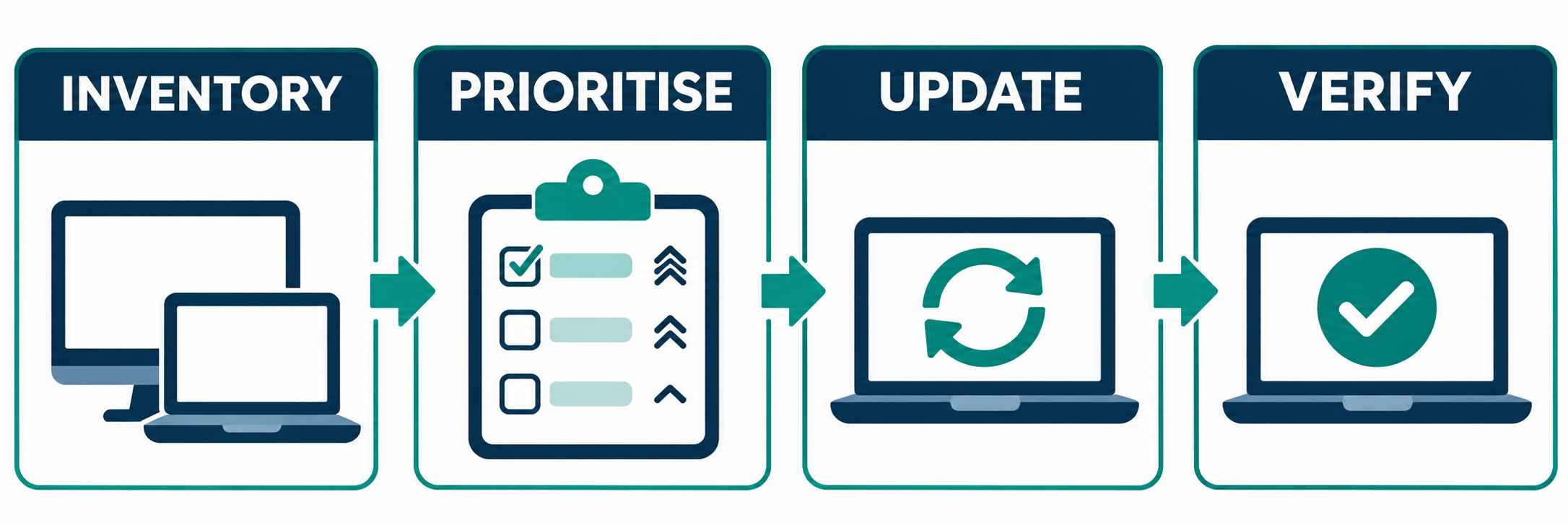
Set a repeatable review rhythm
Hold a short regular review of new vendor advisories and the inventory. Separate routine updates from urgent changes, then agree a maintenance window that reflects actual business hours. For every planned batch, record the devices included, the person who approves the change and the tests needed before and after installation. Notify affected staff when an interruption or restart is expected.
After rollout, compare the intended device list with confirmed installations. Investigate missing reports instead of treating them as successes, and schedule another attempt for offline equipment. Where a failure requires a rollback, record the outcome and any unresolved risk. Retest the affected application after recovery and capture lessons for the next update cycle.
Source checked 24 November 2026: NIST: Guide to Enterprise Patch Management Planning.